
TakeCost vs PlanSwift (2026): Pricing & Feature Comparison
TakeCost vs PlanSwift.
Your next bid, in a browser.
Take your estimating workflow into the browser with TakeCost. Compare it with PlanSwift’s desktop takeoff, assemblies and AI tools, then decide how you want to move from a measured scope to the price you send.
The quick answer
You want browser access with quantities, your costs and proposal output connected in one workflow.
Why choose TakeCost
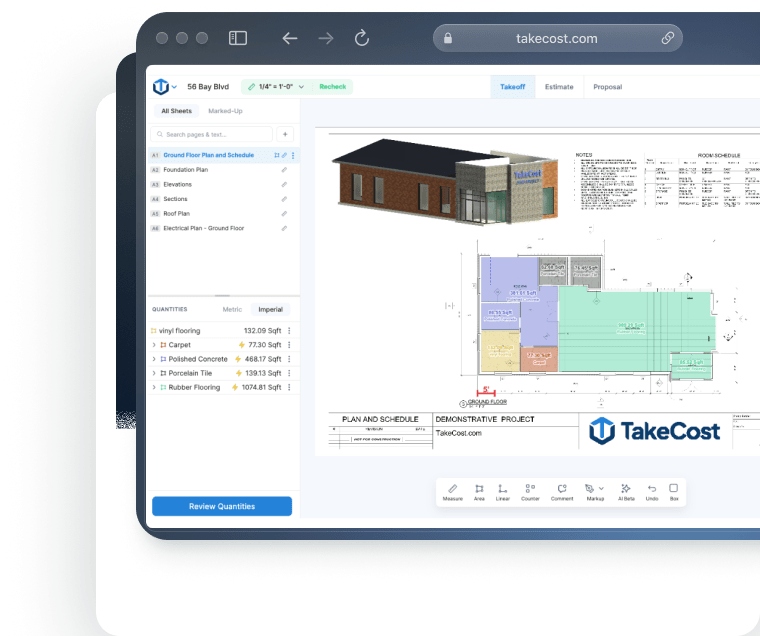
A simple interface, easy controls and AI Assistant guidance help you work through takeoffs. Search plan details, then carry scope into costs and proposals.
When PlanSwift may fit
Consider it if your team relies on existing Windows desktop assemblies, formulas or plugins.
PlanSwift pricing vs TakeCost
Compare the useful plan, its billing commitment and the work it covers—not just the number next to “per month.”
From takeoff to proposal.
$49 billed monthly. Annual option also available.
- Unlimited takeoffs
- Smart Scopes and material quantities
- Material/labour pricing and markup
- Proposal and export workflow
PlanSwift pricing
Annual subscription. Core: $3,000 per seat/year.
Trade assemblies, formulas and established Excel workflows.
View official PlanSwift pricing ↗| Plan | Published price | What to compare |
|---|---|---|
| Essential | $2,000/seat/year | Takeoff, estimating, assemblies and AI setup/count tools |
| Core | $3,000/seat/year | Essential plus unlimited Auto Takeoff in Takeoff BOOST |
Essential and Core are $2,000 and $3,000 annually for one seat. Optional plugins and packs may cost extra. Confirm quoted currency, taxes and licence terms. Checked October 17, 2026. Dollar currencies may differ; prices are not converted. Confirm currency, taxes, seat entitlement and local terms before purchasing.
Does an installed Windows workflow still fit your team?
PlanSwift is an installed Windows desktop application. Its current documentation recommends Windows 11 Pro or Enterprise, and Mac use requires a suitable Windows environment rather than a native Mac installation. That setup can make sense for an estimator with a dedicated workstation and an established desktop workflow. TakeCost begins in the browser, giving a contractor another way to work through takeoff and estimating without installing PlanSwift locally. Think about who prepares bids, where they work and who supports their devices. The right choice should fit the whole working day. Run a complete TakeCost estimate on your normal computer and compare the practical experience, including drawing navigation, quantity review, cost entry and the final proposal.
Sources: planswift.com · help.constructconnect.com · 2 · takecost.com · 3
Feature comparison, without the guesswork
Both products may solve part of your job well. The useful question is how their documented capabilities fit your estimating process.
| What matters | TakeCost | PlanSwift |
|---|---|---|
| Environment | Browser takeoff and estimating workflow | Installed Windows desktop application |
| Public pricing | $49/month or $490/year; check currency and plan terms | Essential $2,000/year; Core $3,000/year for one seat |
| Automation | Smart Scope quantities connected to costing | Essential AI count/scale/bookmark; Core adds Auto Takeoff |
| Estimate construction | Material/labour costs, markup and proposals | Assemblies, custom formulas and trade estimating workflows |
| Repeat work | Reusable items | Custom assemblies, templates, items and properties |
| Excel | Sharing/export within the estimating workflow | Live Excel Link, export and Excel-initiated takeoff |
| Capacity | Core one new takeoff/month; Accelerated unlimited | Core includes unlimited Auto Takeoff; confirm seat needs |
What it’s like to use
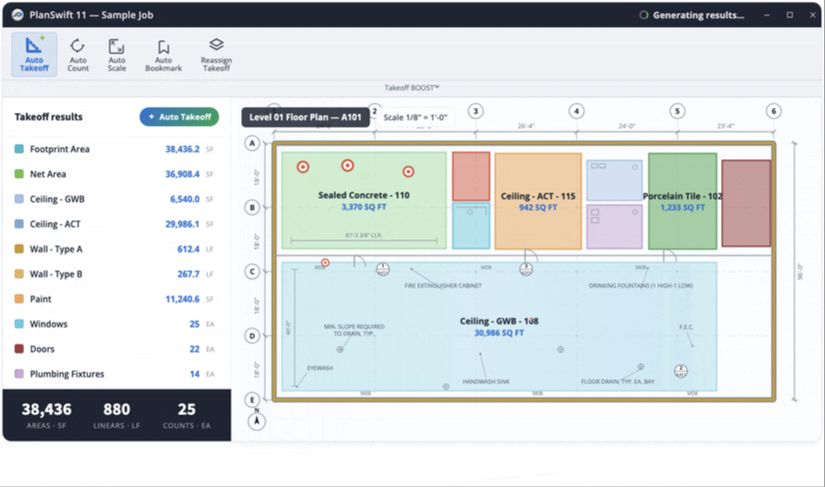
A takeoff tool should help you understand the plan and keep the next step clear. TakeCost pairs a simple interface with easy controls, AI guidance and search for details on your plans.
Your plan. Your tools. In view.
Compare the working view.
Controls that keep the task clear
Use TakeCost’s straightforward interface to measure areas, lengths and counts, then move into quantities and pricing.
A guide while you work
Ask TakeCost’s AI Assistant for help as you work through your takeoff. Get guidance when a question interrupts your flow.
Find details. Keep moving.
Search details on your plans to find information relevant to your scope and support your next estimating decision.
Visual sources: TakeCost · PlanSwift official product page. Checked October 17, 2026.
See how it feels with your own plan.
Try the controls, ask a question and follow a scope through to a proposal.
Compare the work behind a finished bid
Compare an established desktop workflow with TakeCost’s connected route to a proposal.
Upload & measure
Drawings, scale, areas, lengths and counts.
Build quantities
Turn measured scope into material quantities.
Apply your costs
Materials, labour and markup.
Send a proposal
Present the scope and the price.
Choose the workflow your bids need
PlanSwift combines desktop takeoff with estimating tools and reusable assemblies. TakeCost offers browser takeoff connected to quantities, costs, markup and proposals. The useful comparison is how each handles the scope and pricing method you repeat on everyday bids.
Sources: planswift.com · takecost.com · 2
Protect the assemblies you have already built
Existing PlanSwift assemblies and formulas represent estimating knowledge. Keep a reviewed project as a baseline, then check quantities, labour and material costs in TakeCost. Confirm supported transfer routes before assuming your current library will import directly.
Sources: planswift.com · takecost.com · 2
Compare automation on your own drawings
Include PlanSwift’s current AI offer and its terms in your evaluation. Check what is included in your licence, then review the output against a familiar scope. TakeCost’s case rests on its connected estimating workflow; neither product removes the need to check the bid.
Sources: planswift.com · takecost.com · 2
See the whole bid come together.
Try TakeCost with a drawing you already understand.
Evaluating a move from PlanSwift
Use one completed job to check these five points before switching.
- Retain your PlanSwift jobs, source drawings, reports and pricing workbooks.
- Identify the most frequently used assemblies and formulas.
- Recreate a completed representative scope in TakeCost.
- Reconcile units, quantities, materials, labour and markup separately.
- Validate reusable items, the proposal, supported data transfer and takeoff capacity.
TakeCost or PlanSwift: which fits your next job?
Make the bid your focus.
You want browser access with quantities, your costs and proposal output connected in one workflow.
Explore TakeCost free ↗Fit the tool to your operation.
Your estimating practice depends on Windows desktop templates, plugins and custom assemblies.
Three reasons to choose TakeCost
- Connect measured scope to material and labour costs, markup and proposals.
- Start with Core free for one new takeoff a month.
- Move to Accelerated at $49/month or $490/year for unlimited takeoffs.
TakeCost vs PlanSwift: frequently asked questions
Is PlanSwift still a one-time purchase?
The current standard offers are annual subscriptions: Essential at $2,000/year and Core at $3,000/year for one seat. Legacy customer arrangements may differ. Compare a current quote rather than relying on old perpetual-license articles.
Does PlanSwift have AI takeoff?
Yes. Essential has Auto Count, Auto Scale and Auto Bookmark. Core includes the full Takeoff BOOST suite, including unlimited Auto Takeoff for a first pass at areas, lengths and counts.
Can I use PlanSwift directly on a Mac?
PlanSwift is a Windows application and does not have a native Mac installation. Its support documentation discusses using a supported Windows environment through a virtual machine or dual boot. TakeCost starts in the browser.
Can I bring my PlanSwift assemblies into TakeCost?
Do not assume a direct assembly import. Retain your source library and validate a representative set of quantities, rates and formulas in a TakeCost pilot. Establish the supported migration route during a demo before committing a live bid.
Is TakeCost only a measurement tool?
No. TakeCost’s workflow connects area, length, count and elevation takeoff to Smart Scope quantities, material and labour costs, markup and proposals. Test the sequence using a familiar job and your own pricing assumptions.
Sources and comparison methodology
Published by TakeCost from public vendor documentation checked October 17, 2026. Buyer-fit recommendations are our assessment; no common-plan speed or accuracy benchmark was performed. Confirm current prices, currency, plan entitlements and local terms with each vendor.
View official sources (7)
- https://takecost.com/
- https://takecost.com/pricing/
- https://takecost.com/features/
- https://www.planswift.com/pricing/
- https://www.planswift.com/support/install-uninstall/
- https://help.constructconnect.com/getting-started-with-planswift-117/planswift-system-requirements-1649?tid=1649
- https://www.planswift.com/features/
Research maintained by Gevoni · Updated October 17, 2026.
Make your next bid a TakeCost bid.
Bring a drawing from your trade. Measure a scope, add your material and labour costs, and see your proposal take shape.