

This comparison is published by TakeCost. Competitor details were checked against each vendor’s own website in October 2026.
The best construction takeoff software is the one that fits how you measure, price and send work. Compare tools on the same criteria: devices, scale handling, measurement and counting tools, material calculations, the link to your estimate and proposal, revisions, sharing and learning curve. Then trial your shortlist on one real job.
What should you look for in takeoff software?
Use this checklist to score any product. None of these criteria is “best” in the abstract; weight them by your work.
| Criterion | What to check |
|---|---|
| Platform & devices | Windows, Mac, browser, tablet, phone. Does anyone on your team need to work away from the office? |
| Scale handling | Is the scale read from the sheet, set by hand, or both? Can you check it against a printed dimension? |
| Measurement types | Length, area, count, and extras such as wall height, volume, perimeter or cut-outs. |
| Counting and AI help | Counting by symbol or by text, auto scale, auto sheet naming, automated takeoff. How do you review what it found? |
| Assemblies & material calculations | Can a measurement produce materials (studs, drywall, brick, concrete) rather than a bare length or area? |
| Estimate link | Do quantities flow into pricing in the same tool, or go out by export to a spreadsheet or another system? |
| Proposals | Can you produce a client-ready proposal from the priced lines, or is that a separate step? |
| Revisions | What happens when a sheet changes: re-measure, overlay, compare? |
| Collaboration | View-only links, editable sharing, permissions, multiple users on one project. |
| Exports | CSV, Excel, annotated PDF, integrations with other software. |
| Learning curve | How long until a new estimator finishes a job without help? |
| Cost model | Free plan, per-user subscription, annual licence or per-project service. Check current plans on each vendor’s site. |
What are the main types of takeoff tool?
- PDF markup tools. Built for reviewing and marking up drawings, with measurement tools included; pricing usually happens elsewhere.
- Desktop takeoff/estimating suites. Installed software, often Windows-only, with deep takeoff and pricing features on one machine.
- Cloud takeoff tools. Run in a browser with nothing to install; many focus on measuring and export quantities for pricing elsewhere.
- Done-for-you takeoff services. You send drawings and receive quantities from the provider; you review the results rather than measure.
- All-in-one takeoff-to-proposal platforms. Takeoff, estimate and proposal in one product, so the measured quantities become the priced lines that go to the client.
Many products span more than one type, so read each entry below for what the vendor itself says.
How do Bluebeam, PlanSwift, EasyTakeoffs, Beam AI and TakeCost compare?
Each entry sticks to what the vendor states on its own website. For a fuller side-by-side, follow the link in each entry.
| Type | Runs on | Pricing and estimating in the same tool | |
|---|---|---|---|
| Bluebeam | PDF markup tool | Revu for Windows desktop, plus web and mobile | Quantities link to Excel (Quantity Link, higher plans) |
| PlanSwift | Desktop takeoff/estimating suite | Windows | Yes, with material, labour and waste assemblies |
| EasyTakeoffs | Cloud takeoff tool | Browser; responsive on tablets and phones | No; exports CSV for your estimating workflow |
| Beam AI | Done-for-you service, plus self-serve software | Cloud | Self-serve estimating for HVAC and plumbing |
| TakeCost | All-in-one takeoff-to-proposal platform | Browser (Mac and Windows), plus mobile/tablet app | Yes, with a Proposal tab |
Bluebeam
Bluebeam’s plans include Revu for Windows desktop together with Bluebeam on web and mobile. Its measurement tools range from length and area on the entry plan to perimeter, count, angle and volume on higher plans, and Quantity Link with Microsoft Excel on the Complete and Max plans. The Max plan adds AI drawing reviews and AI drawing comparisons. It suits teams whose main work is drawing review and markup. Read TakeCost vs Bluebeam.
PlanSwift
PlanSwift is installed Windows software; its help centre says it can’t be installed directly on a Mac. Takeoff and pricing sit together, with material, labour and waste assemblies that build the estimate as you measure. Its Takeoff BOOST AI tools include Auto Takeoff, Auto Count, Auto Scale and Auto Bookmark. Read TakeCost vs PlanSwift.
EasyTakeoffs
EasyTakeoffs is a cloud web application that runs in the browser and works on tablets and phones. It uses AI to name sheets from title blocks, suggest scales and find matching symbols, includes material templates, and shares takeoffs through read-only links. It handles the measurement side and exports CSV files for your own estimating workflow. Read TakeCost vs EasyTakeoffs.
Beam AI
Beam AI’s main offer is AI-assisted takeoffs and estimates delivered by its team in 24–72 hours, with QA checks before delivery. It also has a self-serve option for instant AI takeoffs in HVAC, plumbing and steel, with in-platform estimating for HVAC and plumbing. It is cloud-based, and its portal lets teams collaborate, manage revisions and download takeoffs. Read TakeCost vs Beam AI.
TakeCost
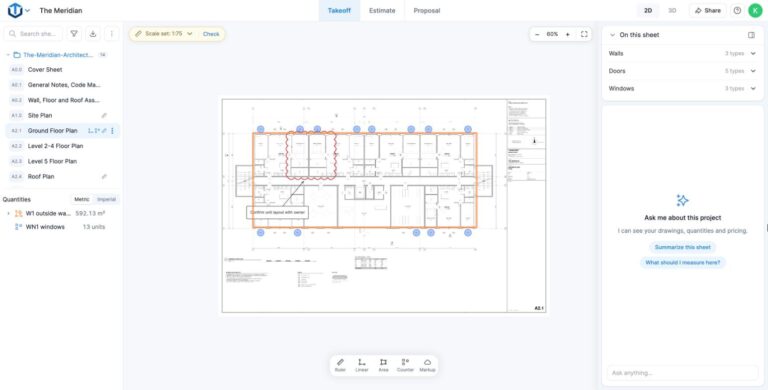
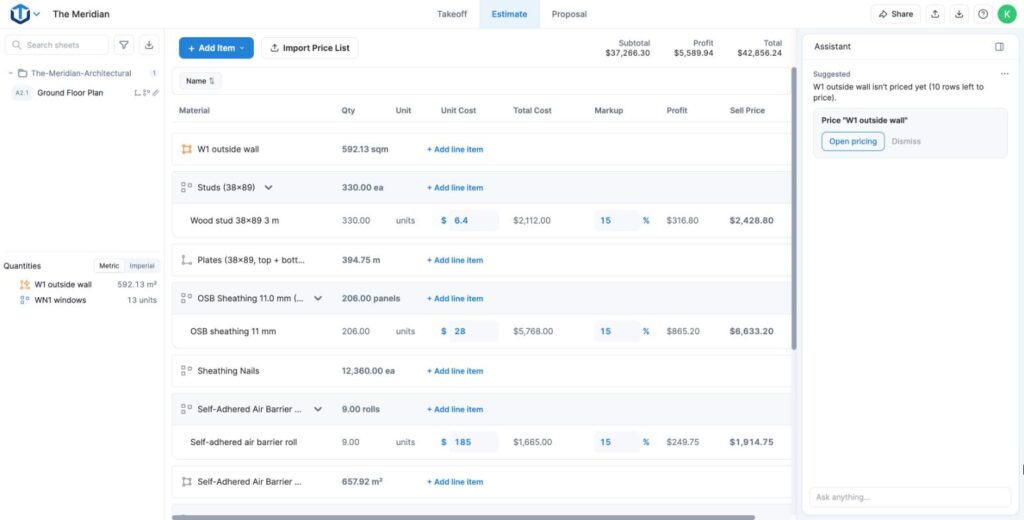
TakeCost runs in the browser on Mac and Windows, plus a mobile and tablet app, with three tabs: Takeoff, Estimate and Proposal. Takeoff tools include Linear, Area, Count (by hand, by symbol or by text) and AutoTake for elevation sheets, with the scale read from the sheet and checked against a printed dimension; Smart Scopes (Pro) turn a measurement into materials. Estimate lines are priced from a Catalog with labour, overhead and markup, and the Proposal is built from those lines and downloads as a PDF. There is a Free plan and a Pro plan. See how to do a takeoff in TakeCost.
Which type of tool fits which contractor?
- Mostly reviewing and marking up drawings, with pricing in a spreadsheet: a PDF markup tool may cover it.
- One estimator on a Windows workstation who wants deep takeoff and pricing in installed software: look at desktop suites.
- Measurement only, with an estimating system you already like: a cloud takeoff tool with good exports.
- No time to measure, or overflow work: a done-for-you service, with time set aside to review its quantities.
- Small teams that measure, price and send proposals themselves, often across devices: an all-in-one platform.
How do you run a fair trial on your own job?
Vendor demos use drawings that suit the product. Your own job tells you more.
- Pick one real job you have already priced, so you know roughly what the answer should be.
- Fix the assumptions: same sheets, same scope, same wall heights, same waste allowances, same unit prices.
- Time three things in each tool: setup (upload, scale, sheet naming), the first full takeoff, and a revision (swap in a changed sheet and update the quantities).
- Check the numbers. Compare key quantities across tools and against your known figures. Where AI did the work, note how long it took to review and correct.
- Score each tool from 1 to 5 on: – operating environment (the devices your team actually uses) – measurements (length, area, count, heights) – assemblies and material calculations – estimate and proposal output – revisions and checking – sharing with your team
- Have a second person repeat it. Learning curve shows up when someone new tries it.
Most vendors offer a trial or free plan; check current plans on each vendor’s site.
FAQ
What is the best construction takeoff software?
There is no single best tool for every contractor. Choose by your workflow: the devices you use, whether you price in the same tool, whether you send proposals from it, and how often drawings change. Then trial a shortlist on one real job.
Is cloud or desktop takeoff software better?
Neither is better in general. Desktop suites run on one installed machine, often Windows only. Cloud tools run in a browser with nothing to install and are easier to reach from several devices. Pick the environment your team actually works in.
Do I need AI in takeoff software?
AI features such as auto scale, auto count and automatic sheet naming can save time on repetitive work. What matters is that you can see and check what the AI found before you price it.
Can takeoff software also produce the estimate and proposal?
Some can. Desktop suites such as PlanSwift price as you measure, and all-in-one platforms such as TakeCost go from takeoff to estimate to proposal. Others focus on measurement and export quantities to a spreadsheet or another estimating tool.
How long should a software trial take?
Long enough to finish one real job and one revision in each tool. For most teams that is a few working sessions per product.
Try TakeCost on your own job
Run the fair-trial steps above with TakeCost alongside the other tools on your list. Start free (a 14-day Pro trial is included on signup) or book a demo.
Related: TakeCost vs Bluebeam · TakeCost vs PlanSwift · TakeCost vs EasyTakeoffs · TakeCost vs Beam AI · What is a construction takeoff? · Features
Bluebeam, Revu, PlanSwift, EasyTakeoffs and Beam AI are trademarks of their respective owners.