


This comparison is published by TakeCost. Competitor details were checked against EasyTakeoffs’ own website in October 2026.
TakeCost and EasyTakeoffs both run in the browser and both measure lengths, areas and counts on PDF plans, with AI help for sheet names and scale. The main difference is what happens after the takeoff: EasyTakeoffs exports quantities to CSV or PDF for estimating elsewhere, while TakeCost prices them into an estimate and builds a proposal in the same product.
What is the difference between TakeCost and EasyTakeoffs?
The difference is scope. EasyTakeoffs describes itself as a cloud takeoff tool: you measure, organise measurements into groups, run material templates, and export. Its site says the exports let you plug quantities into “your estimating workflow”, and it doesn’t describe unit costs, labour, markup or proposals.
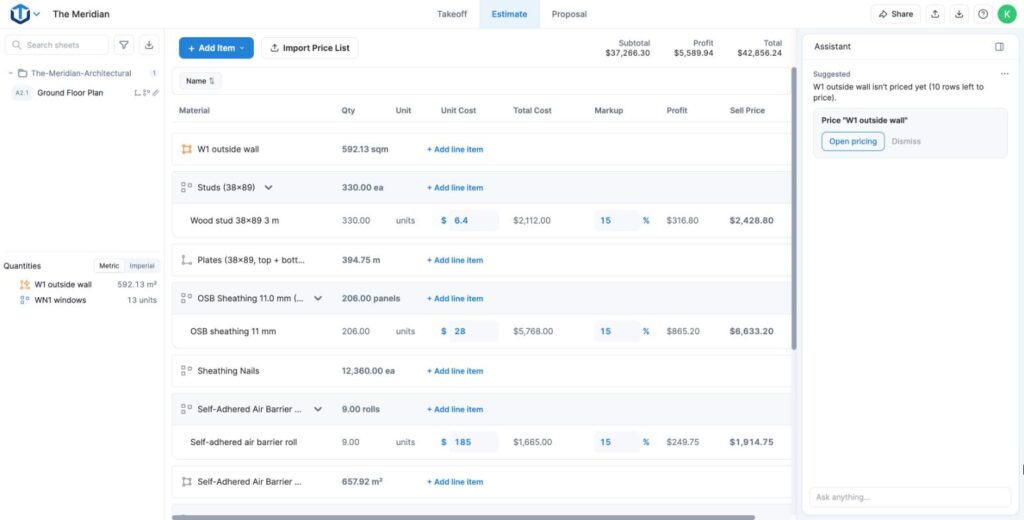
TakeCost covers the takeoff and the two steps after it. Measurements go to the Estimate tab, where each line is priced from a Catalog with labour, overhead and markup, and you see cost, profit and total. The Proposal tab turns those priced lines into a proposal with your company and client details, inclusions and exclusions, and an acceptance section.
So the question for most contractors isn’t which tool measures better. It’s whether you want the estimate and proposal in the same tool as the takeoff, or in a separate one.
How do the two tools compare side by side?
| TakeCost | EasyTakeoffs | |
|---|---|---|
| Where it runs | Browser (Mac and Windows), plus a mobile and tablet app | Browser (Windows, Mac, Linux, Chromebook); responsive on tablets and phones, no separate app |
| Measurement tools | Linear, Area, Count (by hand, by symbol, by text), Ruler, Markup | Lines and polylines, polygons and rectangles, circles, count markers, arcs |
| Scale | Read from the sheet and checked against a printed dimension | Reads printed scale notation; AI suggests a scale where there’s none; Scale Check warns on conflicts |
| Sheet naming | Named automatically from title blocks (Pro) | AI names pages from title blocks |
| Symbol counting | Count by symbol or by text; AutoTake on elevation sheets | Box one example to find matches; AI double-checks matches in image mode |
| Search | Count by text finds tags on the sheet | Text search across all sheets, including scanned ones |
| Material calculations | Smart Scopes attached to a measurement (Pro) | 44 built-in material templates, plus custom templates |
| Estimate | Built in: Catalog pricing, labour, overhead, markup, cost/profit/total | Not described; quantities export for estimating elsewhere |
| Proposal | Built in: Detailed, Scope Price or Lump Sum display, PDF download, proposal review by the Congic Assistant | Not described |
| Exports | CSV and PDF (Pro) | CSV and annotated PDF with a takeoff summary |
| Sharing | With your team by email or link, with permissions | Read-only link, no account needed to view |
| Plans | Free plan and Pro; 14-day Pro trial | Paid subscription with a 14-day free trial |
Check current plans and prices on each vendor’s site.
How does each tool handle the takeoff?
The two tools overlap most here.
EasyTakeoffs gives you lines, areas, circles and count markers, with snapping to walls, corners and edges and running totals as you draw. Measurements go into colour-coded groups. Its AI reads title blocks to name pages and suggests scales for sheets without scale text. Symbol counting works by boxing one example; in image mode, AI double-checks each match before it’s added.
TakeCost has Linear, Area, Count, Ruler and Markup on the takeoff toolbar. The scale is read from the sheet and you check it against a printed dimension before you measure. Count works by hand, by symbol or by text, so you can find every window tag on a sheet. AutoTake measures elevation sheets for you, and on Pro, sheets are named automatically from their title blocks.
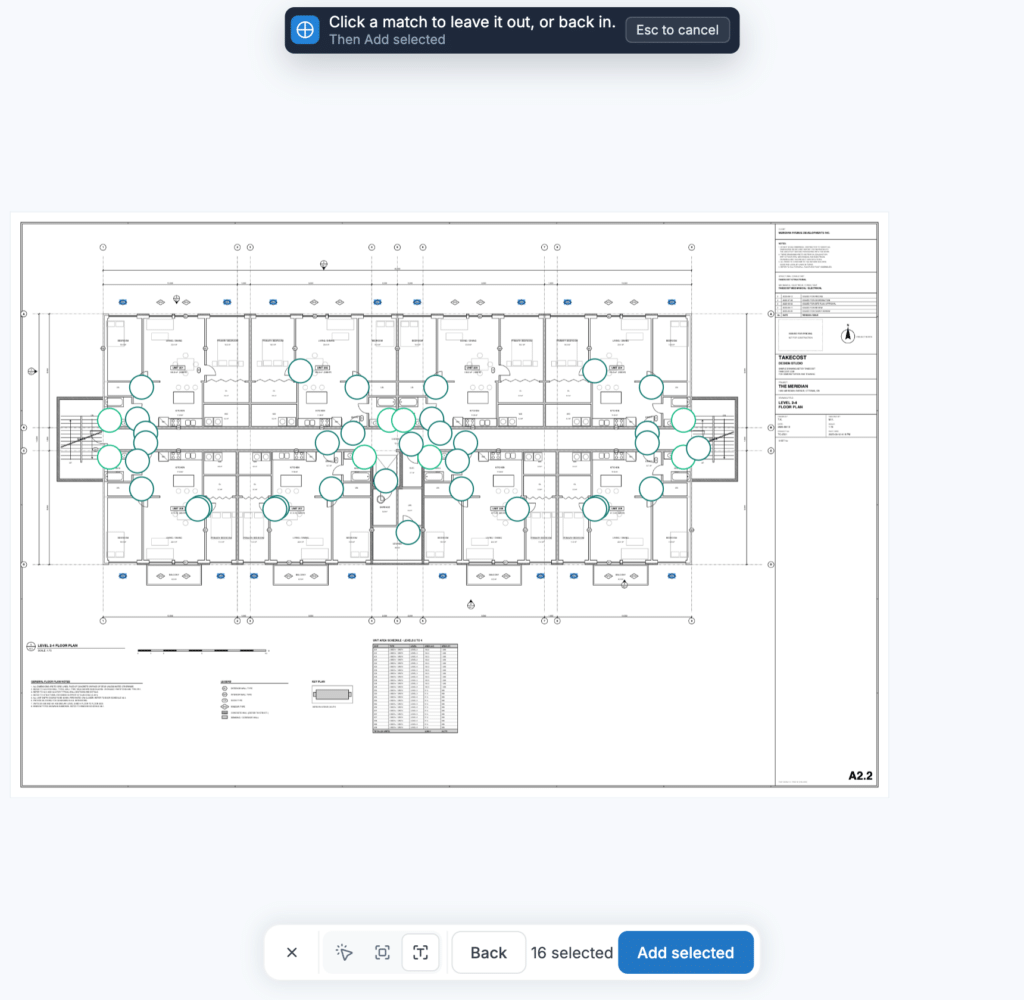
Both tools turn measurements into material quantities. EasyTakeoffs uses material templates that work out quantities, waste and rounding. TakeCost uses Smart Scopes (Pro): calculators attached to a measurement, so a wall can give you studs, track, drywall, brick and mortar, or CMU block. The step-by-step guide shows a whole takeoff: how to do a construction takeoff in TakeCost.
What happens after the takeoff?
This is where the tools part ways.
With EasyTakeoffs, you export. The CSV is organised by group with subtotals, units and material quantities; the PDF carries your markups and ends with a takeoff summary. You then price the job in your own spreadsheet or estimating software and write the bid there.
With TakeCost, the measurements are already in the Estimate tab. You price each line from your Catalog and add labour, overhead and markup. The Proposal tab builds the proposal from those priced lines, displayed as Detailed, Scope Price or Lump Sum, and you download it as a PDF. The Congic Assistant can review the proposal before you send it.
Revisions are worth testing too. With a takeoff-only tool, a drawing change means updating the takeoff, exporting again and carrying the new numbers into your estimate. Time how each tool handles a real revision before you decide (see below).
How do sharing and devices compare?
Sharing. EasyTakeoffs creates a read-only link that anyone can open without an account. Viewers can click measurements to see their details but can’t edit them, and you can turn the link off. That works well for showing a takeoff to a client or a GC. TakeCost shares with your team by email or link with permissions, so colleagues can work on the same project rather than only view it.
Devices. EasyTakeoffs runs in any modern browser, with a responsive layout and touch gestures on tablets and phones; it has no separate app and suggests a desktop or laptop for long sessions. TakeCost runs in the browser on Mac and Windows, and also has a mobile and tablet app with full functionality.
How to compare them on your own job
A feature table only goes so far. The fairest test is to run the same job through both tools.
- Pick one real drawing set with walls, floors and something to count, and use the same assumptions in both tools: same scale, same wall heights, same waste.
- Time three things: setup (upload, scale, sheet names), the first full takeoff, and one revision after a change to the drawings.
- Score each tool on: – Operating environment: where it runs, and whether it works where you do. – Measurements: do both give the same quantities? Check one area and one count by hand. – Assemblies and material calculations: templates versus Smart Scopes for your trade. – Estimate and proposal output: how long from finished takeoff to a proposal you’d send? – Revisions and checking: how quickly does a change reach the price? – Sharing: can the people who need it see it, or work in it?
For a wider view of the options, see the best construction takeoff software.
Who is each tool a good fit for?
EasyTakeoffs fits contractors and estimators who want a simple browser takeoff tool, already price jobs in a spreadsheet or another estimating program, and mostly need quantities and material counts. Its view-only links suit sharing a takeoff with people outside the company.
TakeCost fits contractors who want the takeoff, estimate and proposal in one product, so quantities don’t have to be exported and re-entered before pricing. It also suits teams that need to share projects with permissions, and estimators who work from a phone or tablet as well as a desk.
FAQ
What is the main difference between TakeCost and EasyTakeoffs?
EasyTakeoffs focuses on the takeoff and exports quantities as CSV or PDF for estimating elsewhere. TakeCost carries the takeoff into a priced estimate and a proposal in the same product.
Does EasyTakeoffs have AI features?
Yes. Its website lists AI sheet naming from title blocks, AI scale suggestions for sheets without scale text, and AI double-checking of symbol-count matches. TakeCost also names sheets from title blocks (Pro) and has AutoTake for elevation sheets and count by symbol or text.
Can I use EasyTakeoffs or TakeCost on a tablet?
Both work on tablets. EasyTakeoffs runs in the browser with a responsive, touch-friendly layout and no separate app. TakeCost runs in the browser and also has a mobile and tablet app.
Can I build a proposal in EasyTakeoffs?
EasyTakeoffs’ site doesn’t describe proposals or pricing. It exports quantities for your own estimating workflow. In TakeCost, the Proposal tab builds a proposal from the priced estimate lines and downloads it as a PDF.
How much do TakeCost and EasyTakeoffs cost?
Both offer a trial: EasyTakeoffs a 14-day free trial, TakeCost a Free plan and a 14-day Pro trial on signup. Check current plans and prices on each vendor’s site.
Try it on your next job
Run one of your own drawings through TakeCost, from takeoff to a proposal PDF, and time it against your current process. Start free or book a demo.
Related: Best construction takeoff software · TakeCost vs Bluebeam · TakeCost vs PlanSwift · TakeCost vs Beam AI · What is a construction takeoff? · Features
EasyTakeoffs is a trademark of its owner.