


This comparison is published by TakeCost. Competitor details were checked against Beam AI’s own website in October 2026.
TakeCost vs Beam AI is mostly a choice between doing takeoffs yourself and handing them off. Beam AI’s widest offer is a done-for-you service: you upload plans and get QA-checked takeoffs back in about 24–72 hours. TakeCost is browser-based software you use yourself, from takeoff to estimate to proposal, on your own schedule.
What is Beam AI?
Beam AI (at ibeam.ai) describes itself as a cloud-based construction estimating platform. It offers two ways to work:
- Done for you. You upload plans and specifications; Beam AI’s team delivers takeoffs, with each takeoff QA-checked before delivery. Beam AI says this is available for all trades and delivered in 24–72 hours, depending on trade scope and project complexity. Beam AI also offers a done-for-you plan for aerial-imagery takeoffs (landscaping, snow, paving and striping), which includes access to its OnSite mobile app.
- Do it yourself. AI takeoff software you run yourself, listed for HVAC, plumbing and steel, with in-platform estimates.
Takeoffs are delivered through the iBeam Portal, where teams upload drawings, collaborate, manage revisions and download takeoffs. Beam AI says estimates come as Excel files across all trades, with in-platform estimating for HVAC and plumbing. Some plans include bid management tools, which Beam AI describes as capturing invitations to bid from your inbox and tracking bid status, due dates, owners, RFIs and addenda in one view.
What is TakeCost?
TakeCost is takeoff and estimating software you use yourself. It runs in the browser on Mac and Windows, and there is a mobile and tablet app with full functionality. The app has three tabs: Takeoff, Estimate and Proposal.
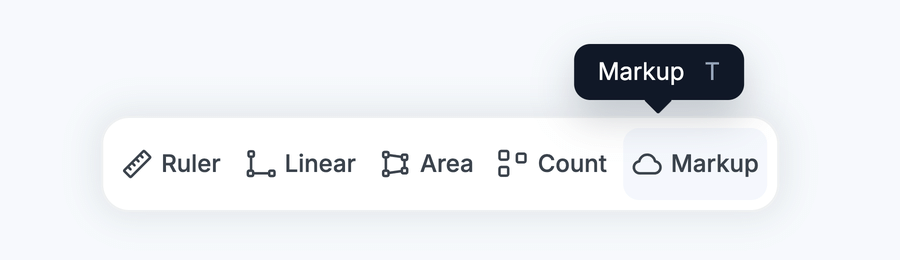
- Takeoff: Linear, Area, Count (by hand, by symbol or by text), Ruler and Markup. The scale is read from the sheet and checked against a printed dimension. AI tools include AutoTake, which measures elevation sheets, and on Pro, sheets are named automatically from their title blocks.
- Smart Scopes (Pro): material calculators attached to a measurement. A wall can give you studs, track, drywall, brick and mortar, or CMU block.
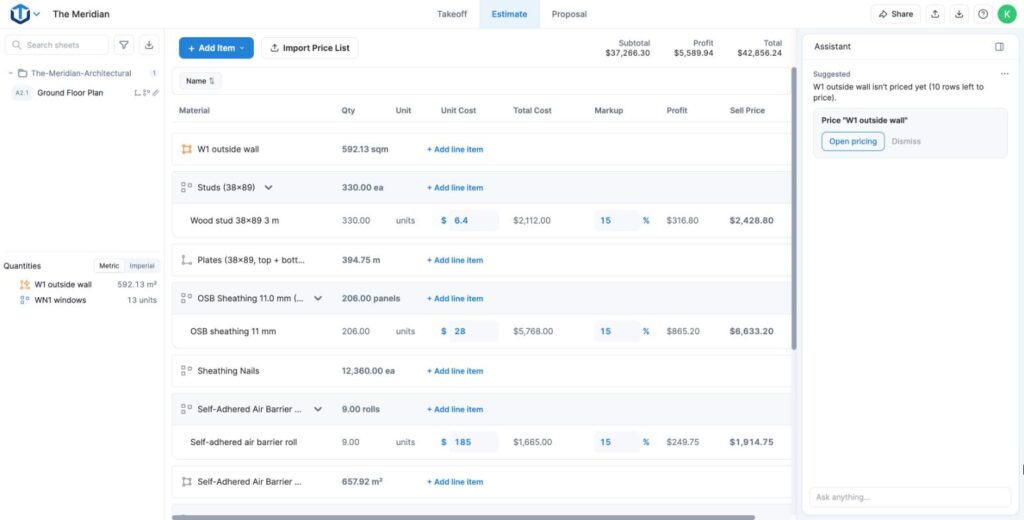
- Estimate: lines priced from your Catalog, with labour, overhead and markup, showing cost, profit and total.
- Proposal: built from the priced lines, shown as Detailed, Scope Price or Lump Sum, with company and client details, inclusions and exclusions, and acceptance. Download it as a PDF. The Congic Assistant can review a proposal before you send it.
- Sharing: invite your team by email or link, with permissions.
There is a Free plan and a Pro plan, with a 14-day Pro trial (up to 2 takeoffs) when you sign up.
How do TakeCost and Beam AI compare side by side?
| Beam AI | TakeCost | |
|---|---|---|
| Main way of working | Done-for-you takeoff service; DIY software also offered | Software you use yourself |
| Who measures | Beam AI’s team (service) or you (DIY) | You, with AI tools to speed it up |
| Turnaround | 24–72 hours for done-for-you, depending on scope | As fast as you work; no queue |
| Trades | Done-for-you: all trades. DIY: HVAC, plumbing, steel | Any trade you can measure with linear, area and count |
| Where it runs | Cloud-based; iBeam Portal on the web | Browser (Mac and Windows) plus a mobile and tablet app |
| Estimates | Excel estimates; in-platform estimating for HVAC and plumbing | Estimate tab: Catalog prices, labour, overhead, markup |
| Material calculations | Not compared here | Smart Scopes (Pro) attached to measurements |
| Proposals | Not described on Beam AI’s site | Proposal tab, PDF download, proposal review by the Congic Assistant |
| Collaboration | iBeam Portal: upload, collaborate, manage revisions, download | Share by email or link with permissions |
| Bid management | Bid management tools on some plans | Not compared here |
| Plans and prices | Check current plans on ibeam.ai | Free plan and Pro; check current plans on takecost.com |
Should you outsource takeoffs or do them yourself?
This is the real question behind the comparison. Neither approach is right for every company.
An outsourced service makes sense when:
- You bid more work than your estimators have hours for.
- You don’t have an in-house estimator, or you don’t want to train one.
- A 24–72 hour turnaround fits your bid deadlines.
- You’re happy to review and adjust delivered quantities rather than take them yourself.
Doing takeoffs in software makes sense when:
- You want to see and control every measurement: where it starts, what it’s named and how it’s grouped.
- Bid deadlines are tight or drawings change often, and you’d rather revise a quantity in minutes than send it back.
- Your takeoff feeds straight into your own pricing, labour rates and markup.
- You want the takeoff, estimate and proposal in one place, from the first click to the PDF you send.
Some teams use both: a service for overflow or unfamiliar trades, and their own software for core work and revisions. Beam AI also offers DIY software for HVAC, plumbing and steel, so trade contractors in those fields can compare two software tools directly.
How does AI fit into each one?
Both companies use AI, but in different places.
At Beam AI, AI sits behind the service: Beam AI says its takeoffs are AI-assisted and QA-checked before delivery. Its DIY software runs AI takeoffs for HVAC, plumbing and steel.
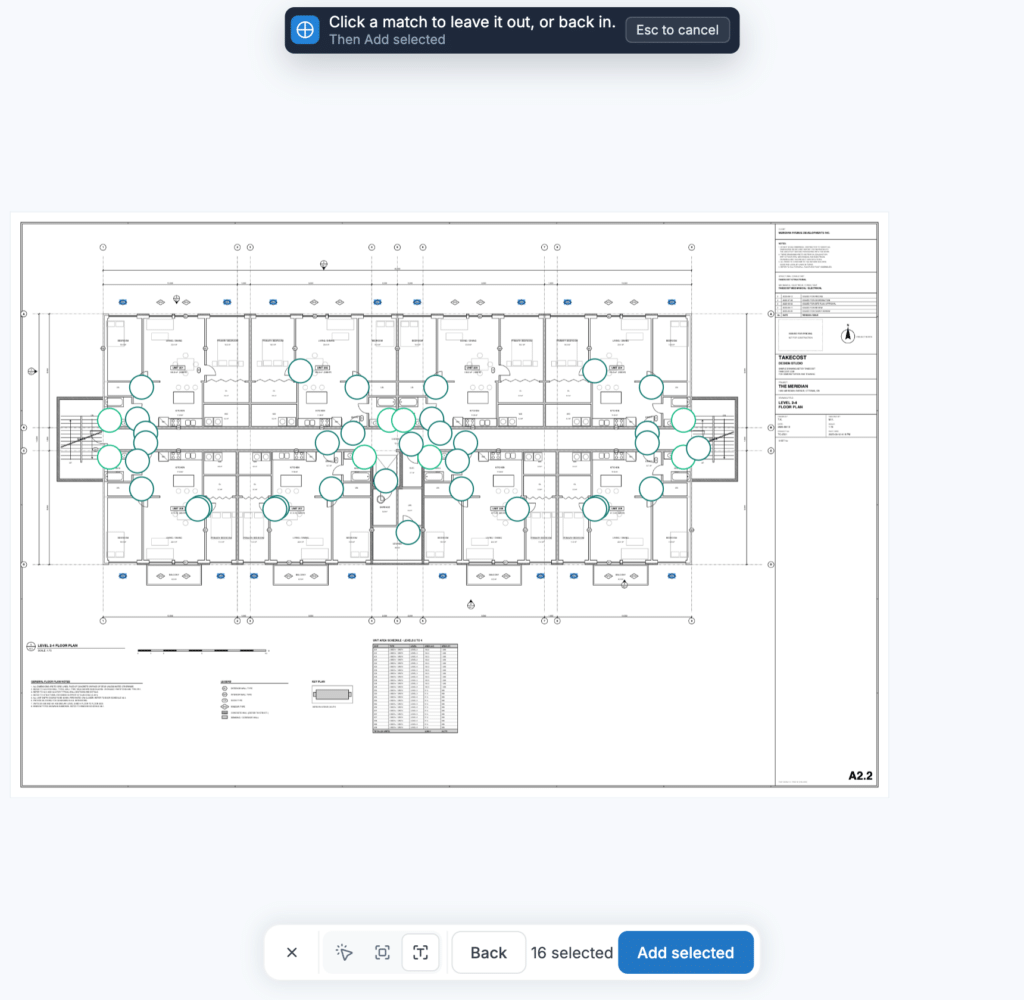
In TakeCost, AI sits inside the tools you use. AutoTake measures elevation sheets, Count can find symbols and text on a sheet, and the Congic Assistant can review a proposal before you send it. Every quantity stays a measurement on your drawing that you can select, check and change.
How do you go from quantities to a price?
With a done-for-you takeoff, you receive quantities and, from Beam AI, an estimate in Excel or, for HVAC and plumbing, in the platform. Your own pricing and proposal steps then happen wherever you keep them.
In TakeCost, a measurement can carry a Smart Scope (Pro) that turns it into materials. Those lines flow into the Estimate tab, where they’re priced from your Catalog with labour, overhead and markup, and then into the Proposal tab. Change a wall’s height, and the quantities that depend on it follow.
How to compare them on your own job
The only comparison that really counts is one on your own drawings.
- Use the same drawing and the same assumptions. Pick a recent job you’ve already priced, and fix the scope, wall heights and waste before you start.
- Time three things: setup (account, upload, scale), the first full takeoff, and one revision, such as a changed wall type or an added room. For a service, the clock includes the wait for delivery and for the revised takeoff.
- Score each option on: – Operating environment: where it runs, and whether your team can use it in the office and on site. – Measurements: accuracy against your own numbers, and how easy each quantity is to check. – Assemblies and material calculations: whether one measurement gives you the materials you price. – Estimate and proposal output: what you get at the end, and how much rework it needs before it goes to a client. – Revisions and checking: how quickly a drawing change becomes a new number you trust. – Sharing: how your team and others see and comment on the work.
Write the results down. The right answer depends on your trade, your bid volume and who on your team does the estimating.
FAQ
What is the main difference between TakeCost and Beam AI?
Beam AI’s widest offer is a done-for-you takeoff service, delivered in about 24–72 hours, with DIY software for HVAC, plumbing and steel. TakeCost is software you use yourself to take off, estimate and build a proposal.
Is Beam AI a service or software?
Both. Beam AI offers a done-for-you takeoff service for all trades and do-it-yourself AI takeoff software for HVAC, plumbing and steel, with takeoffs delivered through its iBeam Portal.
Does TakeCost use AI?
Yes. TakeCost includes AutoTake for elevation sheets, counting by symbol and by text, and the Congic Assistant, which can review your proposal before you send it. Automatic sheet naming and Smart Suggestions are on the Pro plan.
Can I use TakeCost on a phone or tablet?
Yes. TakeCost runs in the browser on Mac and Windows, and there is a mobile and tablet app with full functionality.
How much do TakeCost and Beam AI cost?
Plans change, so check current plans on each vendor’s site. TakeCost has a Free plan and a Pro plan, with a 14-day Pro trial (up to 2 takeoffs) when you sign up.
Try TakeCost on your next job
Upload a drawing you’ve already priced, take it off, and compare the numbers and the time. Start free or book a demo.
Related: Best construction takeoff software · How to do a construction takeoff in TakeCost · What is a construction takeoff? · TakeCost vs Bluebeam · TakeCost vs PlanSwift · TakeCost vs EasyTakeoffs · Features
Beam AI is a trademark of its owner.