
Takeoff to Proposal Software for Contractors
Takeoff to proposal software.
Measure, price and send in one place.
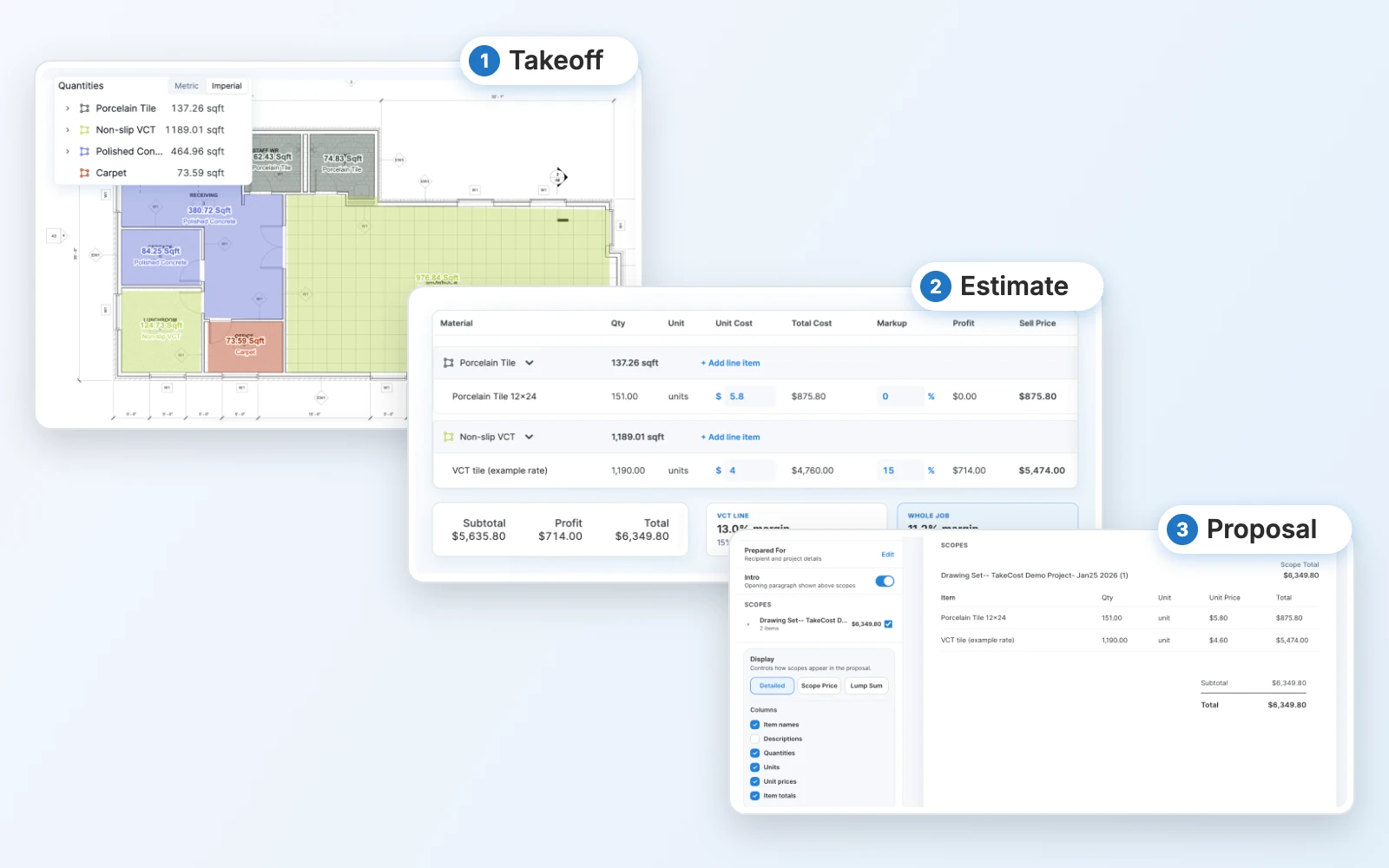
The fastest way to turn a takeoff into a client proposal is to keep the takeoff, the pricing and the proposal in the same project. Then your quantities flow into your prices and your proposal without retyping anything. TakeCost does this in three tabs, Takeoff, Estimate and Proposal, in your browser.
The quick answer
Look for one tool that measures the plan, prices the quantities with your material and labour costs and markup, and turns the priced lines into a proposal you can send.
Where TakeCost fits
TakeCost is built for that route. The free plan includes unlimited proposals and revisions, and Pro is $49 a month or $490 a year for unlimited takeoffs.
From drawing to proposal in three steps
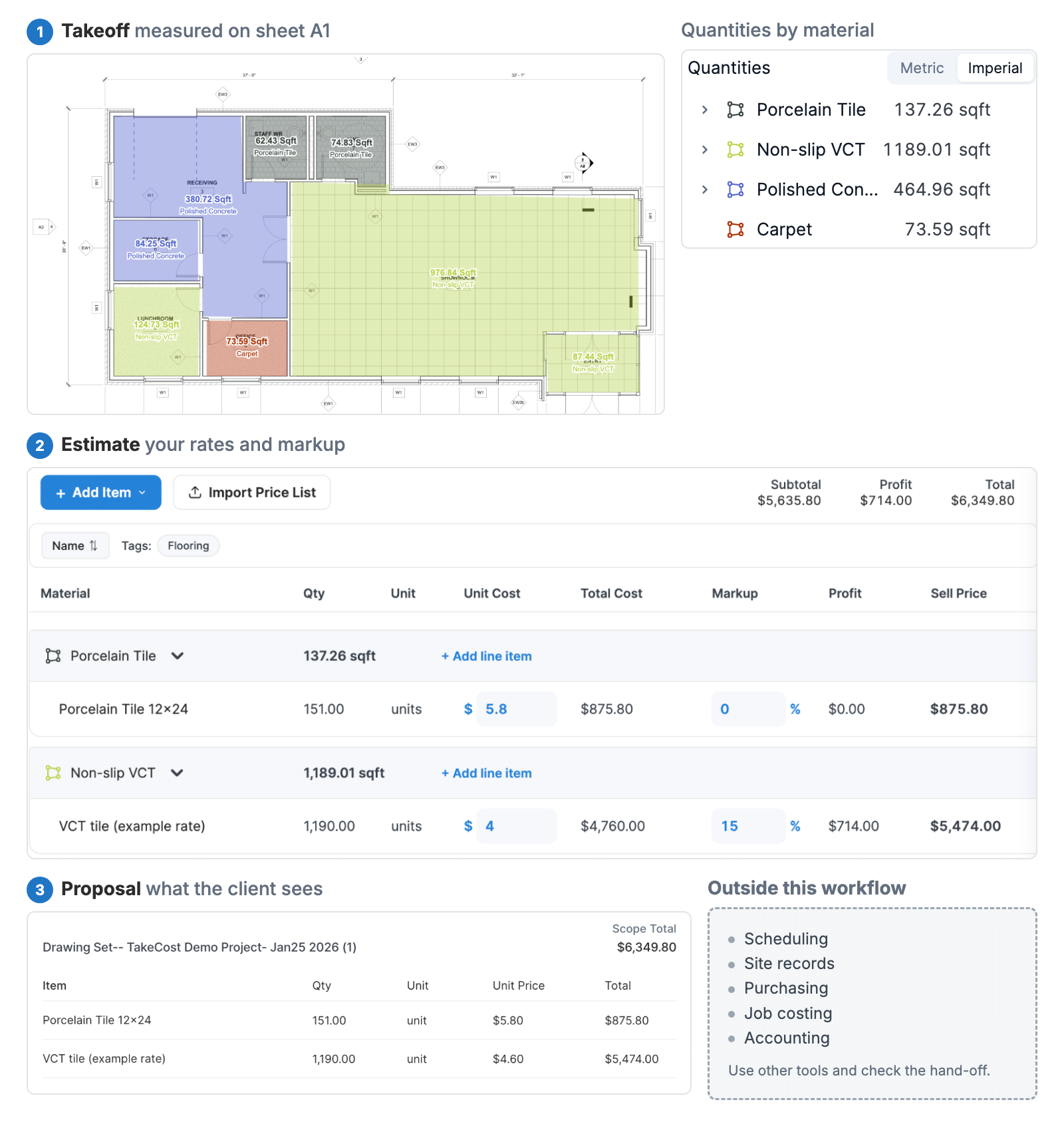
The takeoff measures the work, the estimate prices it, and the proposal is what the client sees. In TakeCost each step is a tab in the same project.
Takeoff
Upload PDF plans, set the scale, and measure areas, lengths and counts. Smart Scopes turn measured scope into material quantities.
Estimate
Measurements become lines you price from your Catalog, with material, labour, overhead and markup. You see cost, profit and total as you go.
Proposal
The priced lines become a client-ready proposal, which you download as a PDF and send.
Why one tool beats three
When the takeoff, the spreadsheet and the proposal live in separate tools, every change to the drawings means re-measuring, re-pricing and retyping. Keeping them in one project means a changed measurement flows through to the price and the proposal.
See a proposal come together.
Measure one scope you already know and compare the total with your last bid.
What goes in a TakeCost proposal
The estimate is your internal cost breakdown. The proposal is what you send the client.
- Your company details and the client’s details
- The scope and the price, built from your priced estimate lines
- Inclusions and exclusions, so the client knows what the price covers
- An acceptance section for the client
- Unlimited proposals and revisions, on every plan
Extra help on Pro
Pro adds 1-click proposals generated straight from your takeoff, generated inclusions and exclusions, and an estimate check that flags missing scope and pricing gaps before you send. You can also export spreadsheets and PDF markups.
A second pair of eyes
The Congic Assistant answers questions about your drawings, quantities and pricing, and it can review your proposal before you send it.
What to look for in takeoff to proposal software
Test any tool on one real job and check these points.
- Do the measured quantities carry into pricing without exporting to a spreadsheet?
- Can you price with your own material and labour costs, overhead and markup?
- Does the proposal show scope, inclusions and exclusions, not just a total?
- Can you revise and resend the proposal after the drawings change?
- Does it run on the computers your team uses, Mac and Windows?
- What does it cost per user per year, and is there a contract term?
Your options for getting from takeoff to proposal
Most tools cover part of the route. The difference is where the pricing and the proposal happen.
| Tool | What it covers | Where the proposal happens | Public price |
|---|---|---|---|
| TakeCost | Browser takeoff, Smart Scope quantities, pricing with markup | In the same project (Proposal tab, PDF) | Free $0; Pro $49/month or $490/year |
| EasyTakeoffs | Cloud takeoff, groups and material templates | Elsewhere: quantities export to CSV or PDF for your own spreadsheet or estimating software | Paid subscription with a 14-day trial |
| Bluebeam | PDF markup, measurement and document collaboration; Excel-linked quantities | Quantities can link to Excel; check how you would price and send the bid | Core $330 or Complete $440 per user a year |
| PlanSwift | Windows desktop takeoff, estimating, assemblies and Excel links | Estimates link to Excel; check how you would produce the client document | Essential $2,000 or Core $3,000 per seat a year |
| STACK | Cloud takeoff and collaboration; integrated estimating on Pro | Estimating is on the Pro plan; check proposal output for your plan | Premium $299 or Pro $349 per user a month, billed annually |
| Buildxact | Residential estimating plus a wider job-management suite | Estimating within the Buildxact suite; check client quote output by plan | Foundation $199 a month or $2,030 a year (US) |
What TakeCost covers, and what it doesn’t
TakeCost covers the bid: the takeoff, the pricing and the proposal, in one project. Scheduling, site records, purchasing, job costing and accounting sit outside that workflow, so keep the tools you already use for those and hand the won job over to them.
TakeCost pricing
From takeoff to proposal.
$49 a month, or $490 a year.
- Unlimited takeoffs
- Smart Scopes and material quantities
- Material and labour pricing with markup
- 1-click proposals, inclusions and exclusions
Measure and send bids free.
Free, forever. No credit card needed.
- Full takeoff tools for area, length and count
- 1 new takeoff file each month
- Unlimited proposals and revisions
- Sharing and the Congic Assistant
New accounts get a 14-day Pro trial with up to 2 takeoffs. See the pricing page for full plan details.
Takeoff to proposal: common questions
What is the best software to turn a takeoff into a proposal?
Look for software that keeps the takeoff, the pricing and the proposal in one project, so quantities flow into prices and the proposal without retyping. TakeCost is built for this: you measure in the Takeoff tab, price in the Estimate tab and send from the Proposal tab.
What is the difference between an estimate and a proposal?
The estimate is your internal cost breakdown: quantities, material and labour costs, overhead and markup. The proposal is what you send the client: the scope, the price, inclusions, exclusions and terms.
Can I create proposals for free?
Yes. The TakeCost free plan includes unlimited proposals and revisions, plus 1 new takeoff file each month. No credit card is needed.
Does TakeCost work on a Mac?
Yes. TakeCost runs in your web browser, so it works on Mac and Windows with nothing to install.
What file types can I measure from?
TakeCost supports single-page and multi-page PDF plans, and common image files such as JPG and PNG.
Can I send the proposal as a PDF?
Yes. In the Proposal tab you build the proposal from your priced lines and download it as a PDF to send.
How much does TakeCost cost?
The free plan is $0. TakeCost Pro is $49 a month or $490 a year, with unlimited takeoffs. New accounts get a 14-day Pro trial with up to 2 takeoffs.
Last updated November 25, 2026.
Send your next proposal from TakeCost.
Bring a drawing from your trade. Measure a scope, add your material and labour costs, and see your proposal take shape.