
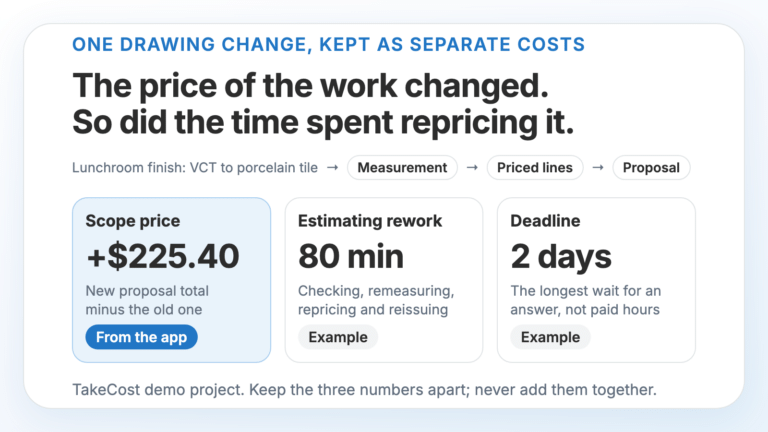

A drawing change can affect both the price you quote and the time spent revising your estimate. Track them separately, alongside any delay to your submission deadline. In the example below, one finish change added $225.40 to the proposal in the live TakeCost app. The 80 minutes of rework comes from an example log we made for this guide, not a measured time.
This guide traces one change from the plan to the proposal, shows the work it repeats and gives you a worksheet to count your own.
The drawing changed. Which parts of your bid are now stale?
Here is the case. On the TakeCost demo project, the ground floor plan is priced with two finishes: non-slip VCT in the showroom, entry and lunchroom, and 12×24 porcelain tile in the two washrooms. Now suppose a revised sheet changes the lunchroom finish from VCT to porcelain tile. The room does not move. Only the finish changes.
The revised drawing here is an example we set up, not a real addendum. The quantities and prices are what the live app produced when we made that one change on October 30, 2026.
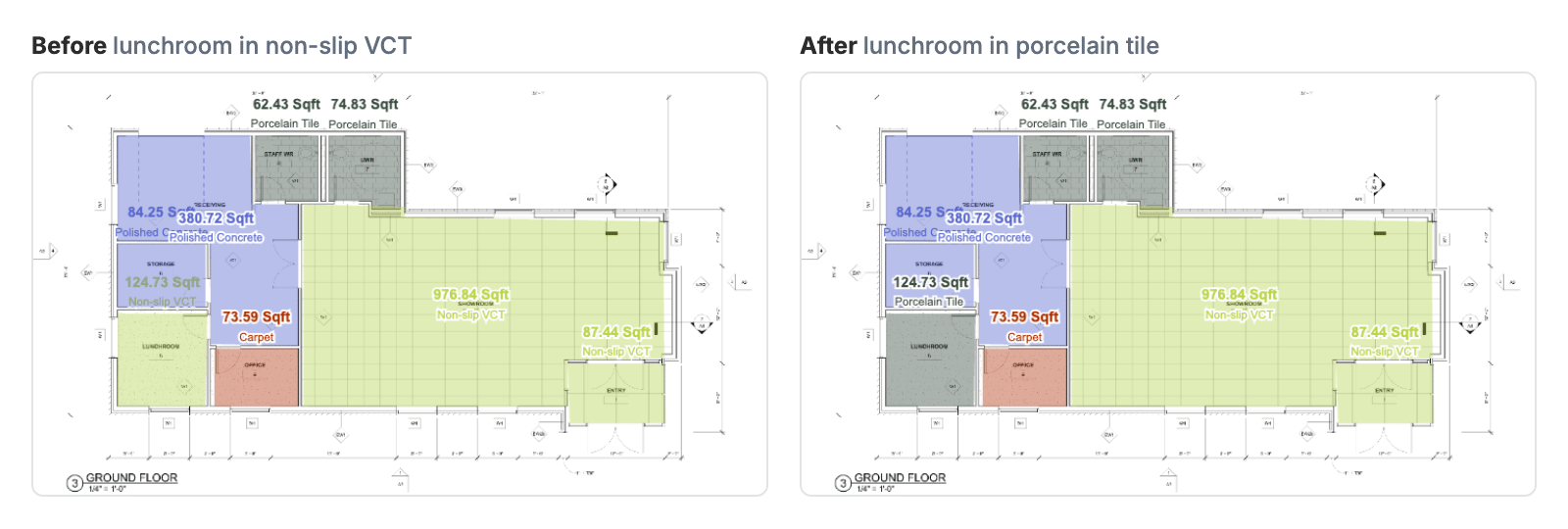
One room, one finish. Here is what that touched:
| Part of the bid | Before | After | Change |
|---|---|---|---|
| Non-slip VCT, measured | 1,189.01 sq ft | 1,064.28 sq ft | −124.73 sq ft |
| VCT line (no waste, whole units) | 1,190 units, $5,474.00 | 1,065 units, $4,899.00 | −$575.00 |
| Porcelain tile, measured | 137.26 sq ft | 262.00 sq ft | +124.73 sq ft* |
| Porcelain line (10% waste, whole units) | 151 units, $875.80 | 289 units, $1,676.20 | +$800.40 |
| Proposal total | $6,349.80 | $6,575.20 | +$225.40 |
*The app shows 262.00 sq ft. The three porcelain areas it lists add to 261.99 because each one is rounded for display.
Just as important is what did not change. The polished concrete, the carpet in the office and the outlet count on the electrical plan are untouched. Checking that takes time too, and it belongs in the count.
Some questions the drawing does not answer: does the lunchroom need a different base or floor prep for tile, and does your tile price hold for almost twice the quantity? Those go on your list before the price goes out.
How much estimating work does one change repeat?
Write down each task as you do it. Keep active time, the minutes someone is working, apart from waiting time, the days you wait for an answer. Waiting is not paid work, but it eats into your deadline.
| Task | Who | Active time | Waiting |
|---|---|---|---|
| Read the revised sheet and find what changed | Estimator | 15 min | None |
| Check what did not change on the other sheets | Estimator | 20 min | None |
| Update the lunchroom measurement | Estimator | 5 min | None |
| Confirm the tile price for the larger quantity | Estimator | 10 min | 1 day for the supplier |
| Ask whether the base or floor prep changes | Estimator | 10 min | 2 days for the designer |
| Review the revised estimate | Owner | 10 min | None |
| Reissue the proposal and note the revision | Estimator | 10 min | None |
The times in this log are an example, not a measurement. Replace them with your own.
A transparent cost example
Add up the active time and multiply it by what an hour of estimating costs your business. Keep the other two numbers on their own lines.
| Number | How it is worked out | Result |
|---|---|---|
| Estimating rework | 80 min active × an example $45 an hour | $60.00 of your time |
| Change in scope price | New proposal total − old total, from the app | +$225.40 on the proposal |
| Time lost to the deadline | Longest wait, if you ask both questions at once | Up to 2 days |
The $60.00 is a cost to you, whatever happens to the bid. The $225.40 is a change in what you charge the client. The two days are a risk to your deadline. Adding them together tells you nothing useful.
Notice too that the scope did not get bigger here. The area stayed the same, and the price still went up, because the new finish costs more and carries more waste. A smaller scope can also cost more than you expect, for the same reasons.
| Line | Example |
|---|---|
| A. Active minutes, all tasks | 80 |
| B. Internal cost of an hour of estimating | $45 |
| C. Estimating rework = A ÷ 60 × B | $60.00 |
| D. Proposal total after the change | $6,575.20 |
| E. Proposal total before the change | $6,349.80 |
| F. Change in scope price = D − E | +$225.40 |
| G. Longest wait for an answer | 2 days |
To work out your own, replace each example with your number and follow the same formulas. Keep C, F and G as three separate results. Do not add them together, and do not count waiting days as paid hours.
How do you see what changed on the drawing?
TakeCost lets you upload revised drawings as a new issue of your set. In the Drawings window, choose Upload drawings, then New issue, give it a name and an issue date, and pick the files. The upload does not change the set you are pricing until you choose to work on it.
Then compare the two sets. TakeCost first lists which sheets were added, re-issued, removed or carried forward. Overlay on canvas then lays the original and revised sheet over each other: anything only in the revision shows in blue, anything only in the original in red, and everything that did not change in purple.
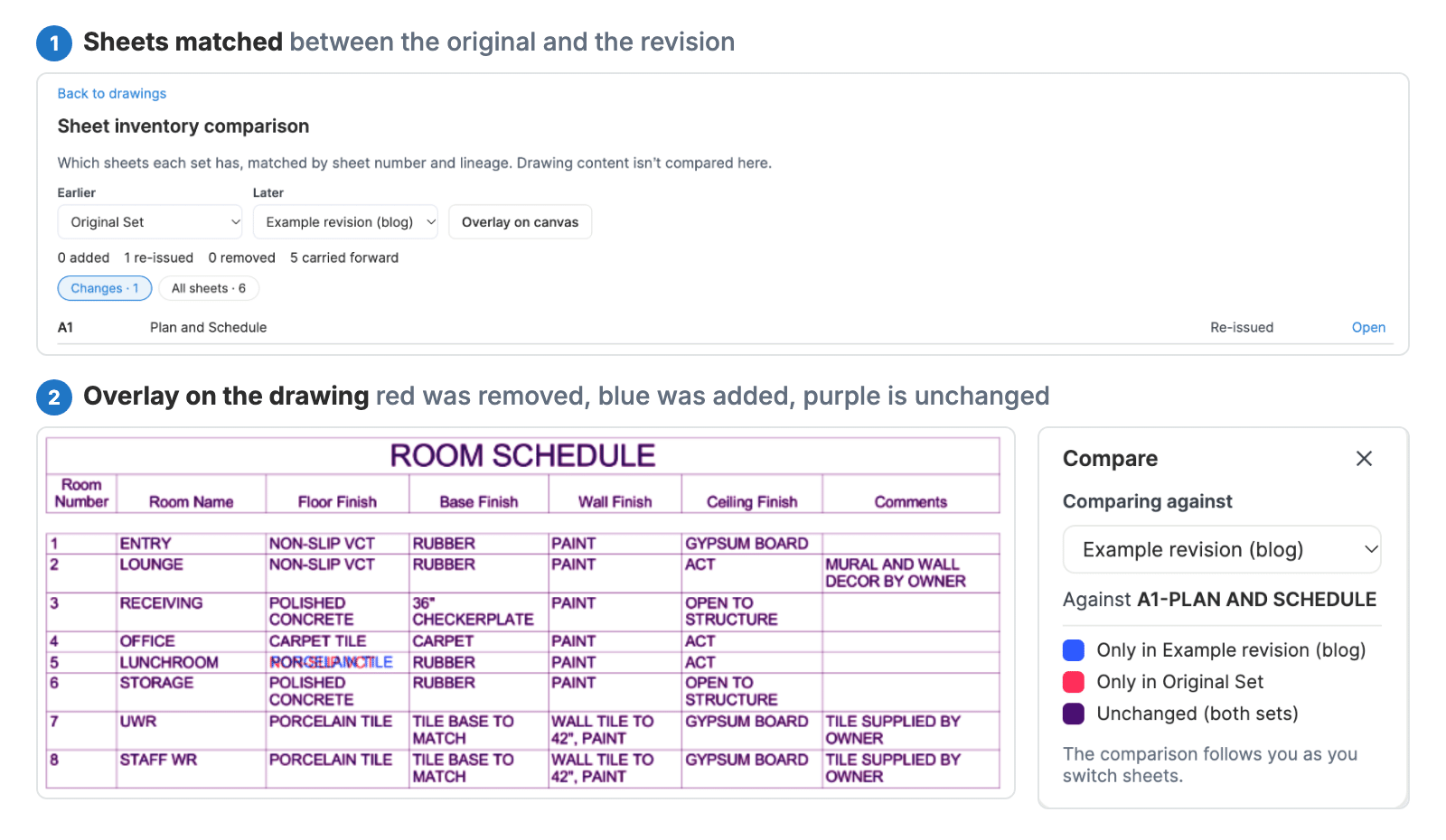
For this guide we made an example revision of sheet A1 that changes only the lunchroom floor finish, and uploaded it to the demo project. In the overlay, that one line was the only change. Use the overlay to find the areas that changed and to confirm the rest really is the same before you remeasure, reprice and check the proposal.
The overlay shows where the drawing changed. It does not change your quantities or prices, and deciding what a change means for your scope is still your call. Drawing revisions come with TakeCost Pro.
What updates on its own, and what you still decide
In TakeCost, the priced lines are tied to the saved measurements. When we changed the lunchroom from VCT to porcelain tile, the app moved 124.73 sq ft between the two materials. Both priced lines then updated on their own, with each line’s waste and rounding to whole units applied, and the proposal total changed to match. We did not retype a quantity or a total.
The repricing took care of itself. These parts are still your call:
- Reading the change. The overlay shows where the drawing changed. Deciding what it means for your scope and updating the measurement is your job. Once you do, the prices follow.
- Reading the scope. Whether tile also means a new base or floor prep is your call.
- Choosing the product. The app priced the lunchroom with the tile line already set up. If the revision names a different tile, that is a new line and a new price.
- Current rates. The unit prices did not change. If your supplier’s price changes with the quantity, you update it.
- The issued offer. A proposal you have already sent does not change. You review the new total and send it again.
Want to see this on a scope you price? Get started, it’s free.
What should you test on your next revised bid?
Try it on a job you have already priced, so the change is the only thing that is new.
- Pick a finished job and keep a copy of its original estimate and proposal.
- Make one change you can describe in a sentence, such as one room’s finish.
- Update the measurement and write down every place the price changed.
- Check each changed line by hand: quantity, waste, whole units and unit price.
- Write down what you had to do yourself, and how long it took.
- Ask whether the result made the change easier to explain to your client.
For the steps of handling a revised set, see our guide to construction estimating. If you are not sure what updates on its own in TakeCost, book a demo and bring the change you want to test.
About our example
The revised drawing is an example we set up. The quantities, line items and totals are what the live TakeCost app showed on October 30, 2026, using the demo project’s example prices. We put the project back to its original state afterwards. The rework times and the hourly cost are examples, not a study of real estimators. The overlay uses an example revision of sheet A1 that we made and uploaded to the demo project on November 5, 2026. We did not test copying a takeoff into a revised set or proposal versions.
Frequently asked questions
Is the estimating cost of a drawing change the same as a change order?
No. A change order is a change to the contract after the job is awarded. This guide is about the work before you submit: finding what changed, remeasuring, repricing and sending the price again.
Does a smaller scope always mean a lower revised price?
No. Waste, rounding up to whole units and a more expensive product can all push a price up. In our example the area stayed the same and the price still rose by $225.40.
Will software automatically update every affected part of my bid?
Not every part. In our test, TakeCost updated the priced lines and the proposal total from the changed measurement. Finding the change, reading the scope, choosing products and checking rates were still our job.
Reviewed by: Gevoni Thomas, TakeCost
Sources
- Revision case: TakeCost demo project, ground floor plan, lunchroom finish changed from non-slip VCT to porcelain tile and back, in the live TakeCost app on October 30, 2026.
- Line settings: the VCT and porcelain tile line items in the demo project’s Estimate tab (waste 0% and 10%, one unit covers 1 sq ft).
- Rework log, hourly cost and waiting times: an example made for this guide.
- Drawing revision overlay: an example revision of sheet A1 uploaded as a new issue to the demo project, compared in the live TakeCost app on November 5, 2026.
- Revision guidance read for this guide: vendor and estimating pages on drawing revisions, read October 30, 2026. None separated estimating effort from the change in price.