
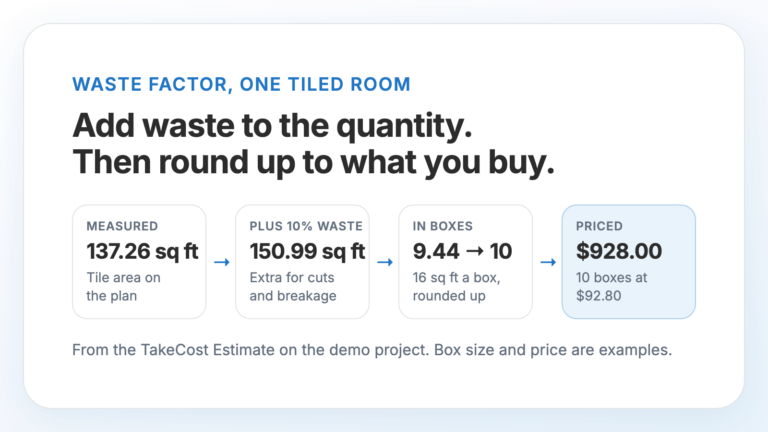

A waste factor is the extra material you add to a measured quantity to cover cuts, offcuts and breakage. Add it to each material’s quantity after doors and windows come out, then round up to the boxes, sheets or bags you actually buy. Start from your supplier’s guidance and your own past jobs, not one flat 10% on everything.
This guide shows where waste belongs in an estimate, one tiled room priced at 0%, 5% and 10% waste in TakeCost, and a simple way to find your own waste rate.
What a waste factor covers, and what it doesn’t
Four different things all add a little extra to a bid. Keep them apart and you can check each one.
| Item | What it’s for | Where it goes |
|---|---|---|
| Waste factor | Material lost to cuts, offcuts, breakage and pattern matching | On each material’s quantity |
| Rounding up | You can’t buy 9.44 boxes | After waste, on the quantity you order |
| Contingency | Things you can’t see yet, like hidden damage or gaps in the drawings | A separate line or allowance you can point to |
| Markup | Your overhead and profit | On cost, once the quantities are set |
Mix them up and you either lose money or charge twice. A 10% waste factor plus a 10% “just in case” on the same tile is 20% extra material, and the client pays for all of it.
Where does waste go in the estimate?
On the material quantity, one material at a time. Not on the price, and not on the job total. Work in this order:
- Measure the area or length from the drawing.
- Take out doors, windows and other openings.
- Add the waste factor to the net quantity.
- Round up to the units you buy.
- Price the line, then add your markup.
Labour is usually priced on the measured area, because your crew installs the floor, not the offcuts. If a layout is slow to cut, lower your daily output for that job instead of raising the waste factor.
One tiled room, start to finish
In the TakeCost demo project, the porcelain tile area measures 137.26 sq ft. We priced it in boxes that cover 16 sq ft at $92.80 a box (example prices) and changed only the waste factor.
| Waste factor | Material needed | Boxes bought | Material cost |
|---|---|---|---|
| 0% | 137.26 sq ft, or 8.58 boxes | 9 | $835.20 |
| 5% | 144.12 sq ft, or 9.01 boxes | 10 | $928.00 |
| 10% | 150.99 sq ft, or 9.44 boxes | 10 | $928.00 |
Two things stand out. Rounding up already gave us extra: 9 boxes is 144 sq ft, almost 5% more than we measured, before any waste at all. And 5% and 10% cost exactly the same here, because both round up to 10 boxes. On a small room, the box size matters as much as the percentage.
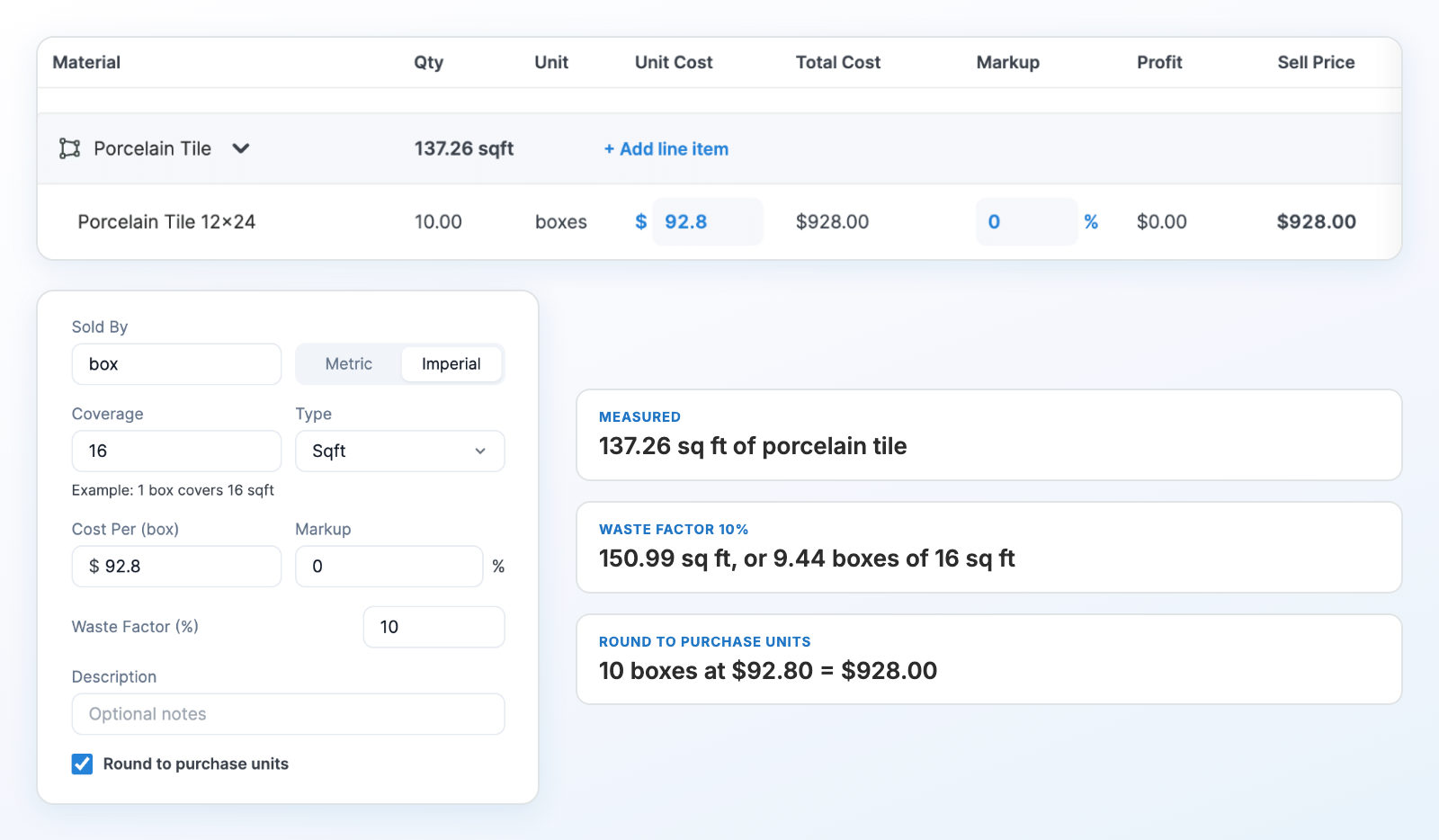
In TakeCost you set the waste factor on each priced line, in the same panel as the coverage, price and markup. With Round to purchase units turned on, the quantity rounds up to whole boxes. We changed the waste factor, reloaded the project, and the new quantity was still there. Items you save to your Cost List keep their own waste factor, so the next estimate starts from your number.
The client doesn’t see the percentage. The proposal for this room showed 10 boxes at $92.80, $928.00 in total.
Try it on a room you have priced before. Get started, it’s free.
How much waste should you add?
There is no single right number. Start with the installation guide for the exact product and ask your supplier what they see on similar jobs. Then adjust for the job in front of you:
| Job detail | Less waste | More waste |
|---|---|---|
| Layout | Straight lay, running bond | Diagonal, herringbone, pattern matching |
| Room shape | Plain rectangles | Lots of corners, angles, closets and doorways |
| Piece size | Small pieces, rolls cut to the room | Large format tile, long planks, full sheets |
| Room size | Large open areas | Small rooms, where offcuts can’t be reused |
| Crew | A crew that plans its cuts | A new crew or a rushed job |
Find your own waste rate
Installation guides and suppliers get you started. Your own jobs tell you more. After a job, write down four numbers for each main material:
- Installed: the area or length from your takeoff.
- Bought: everything you ordered, in the same unit.
- Returned: what went back to the supplier.
- Kept: full boxes or sheets you kept for the next job.
Waste rate = (bought − returned − kept − installed) ÷ installed.
| Job | Installed | Bought, returned, kept | Waste rate |
|---|---|---|---|
| Kitchen, straight tile | 220 sq ft | 256 bought, 16 returned, 8 kept | 12 sq ft wasted, 5.5% |
| Bathroom, diagonal tile | 85 sq ft | 112 bought, 0 returned, 9 kept | 18 sq ft wasted, 21.2% |
| Basement, vinyl plank | 640 sq ft | 700 bought, 20 returned, 10 kept | 30 sq ft wasted, 4.7% |
Three jobs isn’t a rule, but it already tells you more than one number for everything. Here the diagonal bathroom wasted about four times as much as the straight kitchen.
Common waste mistakes
- One flat 10% on everything. Concrete, tile and trim don’t waste the same way.
- Rounding up twice. Waste is added, the quantity rounds up to whole units, and then someone rounds up again by hand.
- Waste on the gross area. Take the openings out first, or you pay for waste on a doorway.
- Stacking waste and “just in case”. Put real unknowns in a contingency line you can explain.
- Hiding waste in the unit price. Nobody can check it later, including you.
About our example
The 137.26 sq ft area is a real measurement from the TakeCost demo project. The 16 sq ft box and the $92.80 price are examples, not a supplier quote. We tested in the live app on November 11, 2026, on a Pro account, and put the demo line back afterwards. The waste log uses made-up jobs.
Frequently asked questions
Is a waste factor the same as markup?
No. Waste is extra material you buy because some of it gets cut off or broken. Markup is what you add to your cost for overhead and profit. Keep them separate so you can check each one.
Should the client see the waste factor on the proposal?
Most proposals show the quantity and price, not the waste. In TakeCost the proposal shows what you are buying, such as 10 boxes, and the price.
Do you add waste before or after taking out doors and windows?
After. Take the openings out first, then add waste to the net quantity.
Does TakeCost add waste for me?
You choose the waste factor on each priced line or saved Cost List item. TakeCost adds it to the measured quantity and, with Round to purchase units on, rounds up to whole units.
Price your next job with your own waste numbers. Get started, it’s free.
Reviewed by: Gevoni Thomas, TakeCost
Sources
- Worked example: TakeCost demo project, porcelain tile area, Estimate and Proposal tabs in the live app, November 11, 2026.
- Example box size, box price and waste log: examples made for this guide.