

A construction proposal should say who it’s for and which drawings it’s based on, the scope you’ll do, the price, what’s included, excluded and allowed for, how long the price holds, when you can start, how you’ll be paid and how the client accepts it.
Then decide how much of the price to break down. Show line items when a GC wants to check your scope line by line, a price per scope for most trade bids, and one lump sum when the job is small and fully drawn. This guide gives you the checklist, the same flooring scope shown all three ways, and the part that prevents most arguments: inclusions, exclusions and allowances.
What to include in a construction proposal: the checklist
A proposal is the price plus everything the client needs to understand it. If you want the difference between a bid, a quote and a proposal first, see takeoff vs estimate vs bid. Here is what goes on the page:
| What to put in it | Why it matters | |
|---|---|---|
| Client and project | Who it’s for, the project name and address, the date | Nobody mixes it up with another job |
| Drawings it’s based on | The drawing set name and date, or the revision you priced | If the drawings change, you can show the price was for the old set |
| Scope of work | The work you’ll do, by area or trade, in plain words | The client sees what they’re buying |
| Price | The total, and as much breakdown as you choose to show | The number they compare and approve |
| Inclusions | What the price covers: supply, install, prep, cleanup | Stops “I thought that was included” |
| Exclusions | What the price doesn’t cover, even if it’s on the drawings | The cheapest way to avoid a dispute |
| Allowances | Amounts for work you can’t measure yet, and what happens if more is needed | Keeps an unknown from becoming your loss |
| Price valid until | A date | Material prices move; an old price shouldn’t bind you |
| Schedule | A start window or how long the work takes | The client can plan around you |
| Payment terms | Deposit, progress payments and when they’re due | You get paid as agreed |
| Acceptance | How the client says yes: a signature, a PO or a written reply | There’s no doubt the price was accepted |
Warranty, insurance and licence details belong on it too if your clients or your area expect them. Contract wording is a question for your own adviser, not a blog post.
Line items, scope price or lump sum: how much price to show
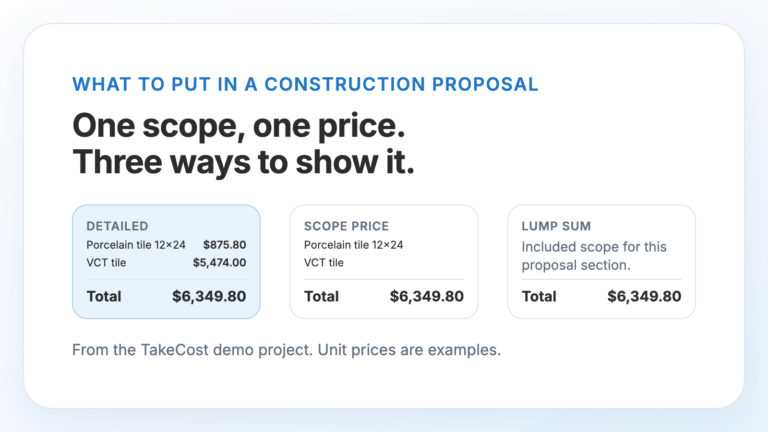
The same scope can go out in three ways. Here it is from the TakeCost demo project: porcelain tile in the washrooms and VCT in the showroom, entry and lunchroom, with example unit prices.
| What the client sees | When it fits | |
|---|---|---|
| Detailed | Porcelain tile 12×24, 151 units at $5.80 = $875.80. VCT tile, 1,190 units at $4.60 = $5,474.00. Total $6,349.80. | A GC levelling bids line by line, a client who asked for unit prices, or work that may be added or cut by area |
| Scope Price | The two line names, with one scope total of $6,349.80 | Most trade bids: the client sees what’s in the scope, without a unit price to argue over |
| Lump Sum | The scope name and “Included scope for this proposal section.”, with a total of $6,349.80 | Small, simple jobs where the drawings are complete |
There’s no right answer for every job. More detail builds trust and makes changes easier to price, but it also invites line by line haggling. One number is simple to approve, but it hides what you assumed, so your inclusions and exclusions have to do more of the work.
Whichever you choose, keep the full breakdown on your side. Your cost and markup stay in your estimate. The proposal shows selling prices only.
Inclusions, exclusions and allowances: where most disputes start
Most arguments after a job is won aren’t about the price. They’re about what the price covered. Write these three lists every time, even when the scope looks obvious. Here is what they looked like on the demo floor plan:
- Inclusions. The room schedule says the washroom tile is supplied by the owner. Say whether you’re pricing supply and install or install only. Both are fair; leaving it unsaid isn’t.
- Exclusions. The plan also shows polished concrete and carpet. We measured them but didn’t price them. If they’re not in your price, write that down. A client won’t read “not listed” as “excluded”.
- Allowances. Floor prep can’t be measured until the old floor is up. Price it as its own line with an amount, say what it covers, and say what happens if more is needed.
Exclude by name, not by silence. “Polished concrete and carpet are excluded” is one line, and it can save you a phone call you don’t want.
What to keep off the proposal
- Your cost and markup. The client sees a selling price. Your cost, markup and margin stay in the estimate.
- Your working. Waste factors, crew hours and supplier quotes are how you got the price, not part of it.
- Lines you haven’t priced. Price them, allow for them or exclude them. Don’t leave a measured item sitting on the page with no price.
- Internal notes. Anything you wrote for yourself or the crew.
Building a construction proposal in TakeCost
In TakeCost, the proposal comes from the priced estimate, so the quantities you measured on the drawings flow straight into it. Most of the checklist has a place in the Proposal tab:
- Proposal Details holds the date and an Expiry Date, your price valid until. Prepared For holds the client’s name, address, phone and email.
- The Intro is an opening paragraph above the scopes. There’s no separate field for the start window or payment terms, so this is a good place for them.
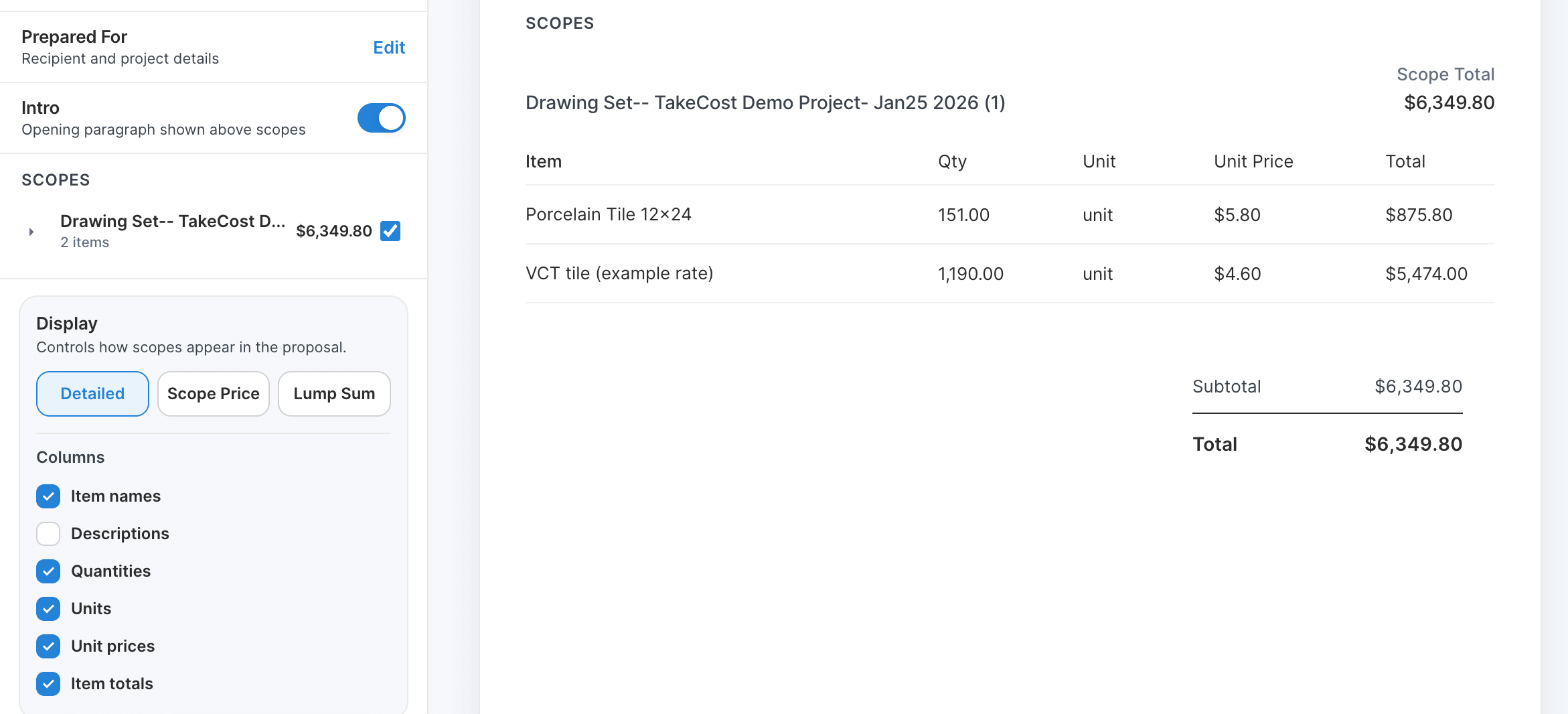
- Each scope is named after the drawing set you measured, and only priced lines appear. Under Display, choose Detailed, Scope Price or Lump Sum. In Detailed, pick the columns: item names, descriptions, quantities, units, unit prices and item totals.
- Proposal Notes has two lists, Inclusions and Exclusions, and shows in every display. For an allowance, add a general item in the estimate, a line not tied to a drawing, so it shows as its own priced line.
- Turn on Scope Drawings to attach the marked-up drawing pages with a legend of what you measured.
- Acceptance adds a signature and date block. Download the PDF, check it and send it.

We tested the Proposal tab on a Pro account. Check the pricing page for what each plan includes.
Want the whole path from drawing to proposal? See how contractors build a construction estimate. Then build your next one from the drawings. Get started, it’s free.
About our example
The lines, totals and displays are from the TakeCost demo project in the live app on November 16, 2026. The unit prices are examples, not market prices. We added the two Proposal Notes lines for this guide, checked them in the downloaded PDF and removed them afterwards. The checklist is general guidance, not legal advice.
Frequently asked questions
Is a construction proposal a contract?
It can become part of one once the client accepts it. How that works depends on your contract and where you work, so check with your own adviser.
Should a subcontractor itemize a bid to a GC?
Give the GC what their bid form asks for. If they don’t say, a price per scope with clear inclusions and exclusions is the usual middle ground, and you can share unit prices if asked.
How long should a proposal price be valid?
Long enough for the client to decide, and short enough that your material prices still hold. Write a date on it rather than leaving it open.
What’s the difference between an exclusion and an allowance?
An exclusion is work your price doesn’t cover. An allowance is work your price covers up to a stated amount, because you can’t measure it yet.
Do I show my markup on a proposal?
No. The client sees a selling price. Keep your cost and markup in your estimate.
Measure, price and send your next proposal from one set of drawings. Get started, it’s free.
Reviewed by: Gevoni Thomas, TakeCost
Sources
- Proposal lines, totals, displays and Proposal Notes: TakeCost demo project in the live app, November 16, 2026.
- Owner-supplied tile and the unpriced materials: sheet A1 of the demo drawing set.
- Example unit prices: made for this guide.