

It can, if your estimating week is full of repeat measuring and retyping. Software can shorten that work. It cannot add trade knowledge, get supplier prices sooner or take responsibility for the number. Work out how many checked minutes you would really save on comparable bids, then see whether the rest of your process can use them.
This guide gives you a simple weekly capacity calculation, an example with the math shown, and a way to tell when hiring is still the better move.
Can takeoff software replace an estimator?
No. It can take some of the repetitive work off an estimator’s desk, which frees time. The judgement stays with a person.
| Work | Software can help | Still needs a person |
|---|---|---|
| Measuring and counting | Faster areas, lengths and repeated counts | Checking every quantity before it is priced |
| Retyping | Quantities flow into the estimate and proposal | Deciding what each line should be |
| Pricing | Saved rates you can reuse | Current supplier prices, labour and markup |
| Scope and risk | Marked-up drawings that are easy to discuss | Reading the specs, spotting gaps, deciding what to exclude |
| The final number | Clear totals that are easy to check | Signing off and standing behind the price |
Software alone will not fix these limits:
- Only one person knows how to price your work. Software can take routine measuring and retyping off their desk, which leaves them more time for pricing. You may still need another person for the expertise or review they can’t cover.
- Quotes wait for supplier or subcontractor prices.
- Nobody has time to review a quote before it goes out.
- The drawings or scope you receive are incomplete.
Where did your estimating hours go last week?
Pick one type of job you quote often, such as office fit-outs or small renovations. Averaging very different jobs hides where the time goes. For that job type, write down the hands-on minutes for each part of one complete quote, from opening the drawings to a checked, client-ready proposal:
| Part of the quote | Minutes |
|---|---|
| Setup: files, scale, sheets | 20 |
| Quantities, including your checks | 90 |
| Pricing and the client-ready proposal | 60 |
| Review | 30 |
| Revisions | 20 |
| Total per quote | 220 (3 h 40 min) |
Do this for a normal week and a busy week. Count only time someone actually worked. Days spent waiting for a price or a reply are not hours you can get back, so leave them out of this sum.
How much capacity could you actually use?
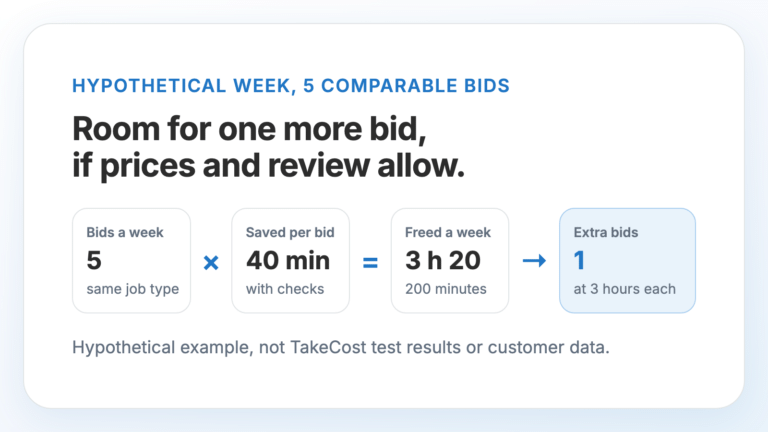
Here is the calculation with made-up numbers. These are not TakeCost test results. Say a contractor quotes five comparable jobs a week, and a takeoff tool cuts the quantity work from 90 to 50 minutes per bid, including the time to check it. Everything else stays the same: pricing, the proposal, review and revisions. So the 180 minutes is still a complete, checked quote ready to send.
| Step | Example |
|---|---|
| Minutes per complete quote today | 220 |
| Minutes per bid with software, checked | 180 |
| Minutes freed per bid | 40 |
| Comparable bids per week | 5 |
| Time freed per week | 200 min (3 h 20) |
| Extra 180-minute quotes that fit | 1, with 20 min left |
In the example, the week has room for one more bid of the same kind. That only holds if three more things are true:
- You can get supplier and subcontractor prices for it in time.
- Someone has 30 minutes to review it.
- The freed time comes in blocks you can use, not 10 minutes here and there.
If the quantity work is small, or checking takes as long as measuring did, the minutes freed drop to zero, and so does the extra capacity.
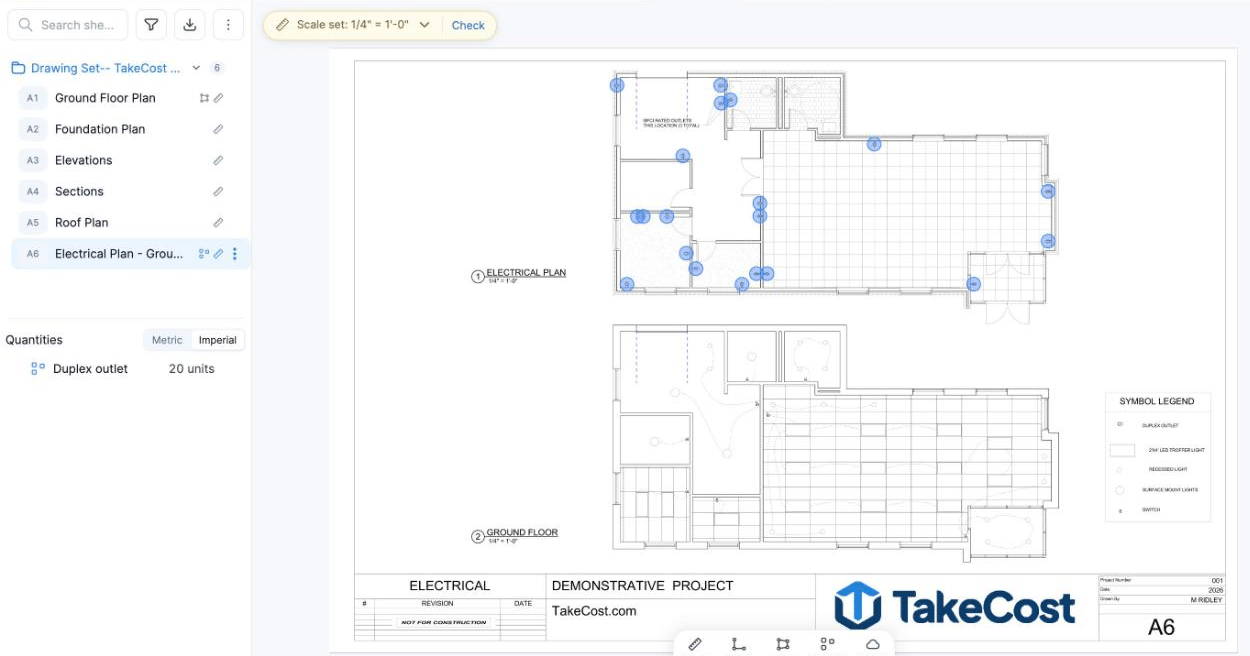
In TakeCost, Find matching symbols finds repeated symbols like these from one sample, and you choose which matches to keep. The quantity then carries into the estimate and proposal without retyping. Find matching symbols comes with TakeCost Pro.
What could the freed hours do for the business?
An extra bid is only one option, and not always the best one. Freed hours could go to:
- Checking the quotes you already send. Fewer mistakes can be worth more than one more bid.
- Following up on quotes that are out. A call to a client who has not replied takes minutes.
- Updating your rates. A current price list makes every later quote faster.
- Bidding one more job you would want to win. Only if you could also staff it.
Keep the steps apart. Freed hours are capacity. They become extra quotes only if you use them for bidding, wins only if those quotes are accepted, and profit only if you can deliver the work well.
When is another estimator the better choice?
| Situation | Software may be enough | Hiring may be needed |
|---|---|---|
| Too many bids for the hours you have | A busy week now and then | More work than hours, week after week, even after the time savings |
| Repeat measuring and retyping | Most of the time goes on counting, measuring and copying numbers | Rarely the reason to hire on its own |
| Trade knowledge | You already know how to price the work | You are bidding work you do not yet know how to price |
| Checking | Totals are easy to trace and review | Nobody else can check the estimator’s numbers |
| Continuity | Takeoffs saved in one place others can open | Bidding stops when one person is away |
Software and hiring are not either-or. A new estimator also works faster with good tools. Everyone who uses TakeCost needs their own account, so count one Pro plan for each estimator.
How do you test this before deciding?
- Pick one scope you quote again and again.
- Time it the way you do it today, from drawings to a checked, client-ready proposal.
- Run the same scope in the new tool, all the way to the same checked, client-ready proposal.
- Repeat on a second comparable job, to see if the saving holds.
- Set a capacity goal, such as one extra bid a week, and check the quality of the quotes before you change any staffing plans.
Want to work out the money side first? See what takeoff software costs and when it pays for itself.
Every new account starts with 14 days of TakeCost Pro, with up to 2 takeoffs, which is enough for two comparable jobs. Get started, it’s free, and see the plans on our pricing page. Our step-by-step TakeCost guide shows the workflow.
About our example
The capacity numbers above are an example, not measured results from TakeCost or from contractors. We have not measured whether extra capacity leads to more wins, more revenue or fewer hires. The screenshot shows one count on a demo project.
Frequently asked questions
Can takeoff software replace an estimator?
No. It can shorten measuring, counting and retyping. Scope decisions, pricing judgement and signing off the number still need an estimator.
Does saving two hours mean I can submit another bid?
Only if a whole bid fits in those two hours and you have the prices and review time it needs. If a bid takes three hours, two hours is not enough.
When should I hire rather than buy software?
When you have more work than hours every week even after the time savings, when you need trade knowledge you do not have, or when nobody can check or cover for the estimator.
Should I bid every job the saved time makes possible?
No. Bid the jobs you would want to win and could staff. Checking or following up on your current quotes may be a better use of the time.
Reviewed by: Gevoni Thomas, TakeCost
Sources
- Capacity example: a hypothetical model made for this guide. The math was checked in a spreadsheet.
- Product example: TakeCost demo project, electrical plan, duplex outlet count, in the live TakeCost app on October 29, 2026.
- TakeCost plans: the in-app plan page and takecost.com/pricing, checked October 29, 2026.