

For a small contractor, the main benefits of digital takeoff software are fewer numbers typed twice, quantities you can check, less setup on repeat work, easier reviews and a shorter route from drawing to priced quote. The software does not choose your prices, labour or exclusions. It pays off when one of these steps is slowing you down today.
This guide follows one real quantity from a drawing to a priced line in TakeCost, then shows where each benefit is big, where it is small, and what you still have to check yourself.
Where can digital takeoff make a difference for a small contractor?
A benefit only counts if it changes a step your business actually does. Use this table to match each benefit to a step in your day, and to the part that stays your job.
| Today’s pain | What changes in TakeCost | What it means for you | What stays your job |
|---|---|---|---|
| Typing quantities in twice | Measured quantities appear on the Estimate tab without retyping | Less time moving numbers between tools and checking they match | Checking the scale and what was measured |
| A total nobody can explain later | Each quantity is made of named, measured pieces on the plan | Questions are settled by looking at the measured scope, not by measuring again | Catching rooms or items nobody measured |
| Setting up the same prices on every job | Line items can be picked from your saved price list | Less setup on every job, and estimates that read the same way | Updating rates when supplier prices change |
| A partner has to redo your takeoff to check it | You share the project, so they review the same drawings and numbers | A second opinion without redoing the takeoff | Deciding what the reviewer must check |
Results depend on your drawings and how you work. Measuring on screen does not make labour assumptions, supplier prices or exclusions right on its own.
How does digital takeoff cut down on numbers typed twice?
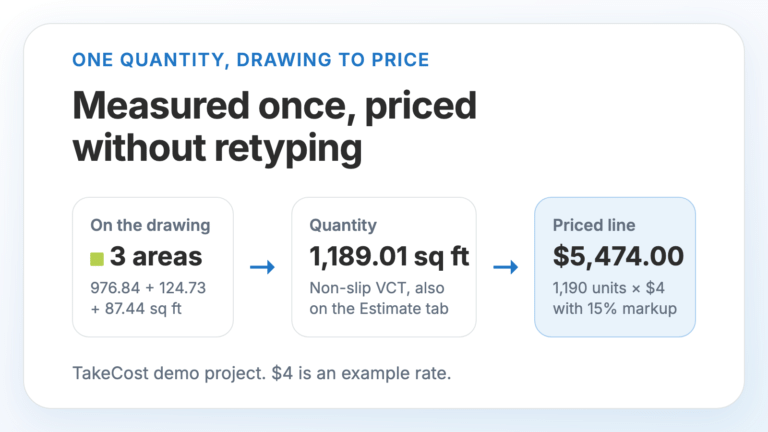
Here is one quantity followed from the drawing to a priced line. It comes from the TakeCost demo project, an office renovation, measured in imperial units. The price is an example rate, not a real supplier quote.
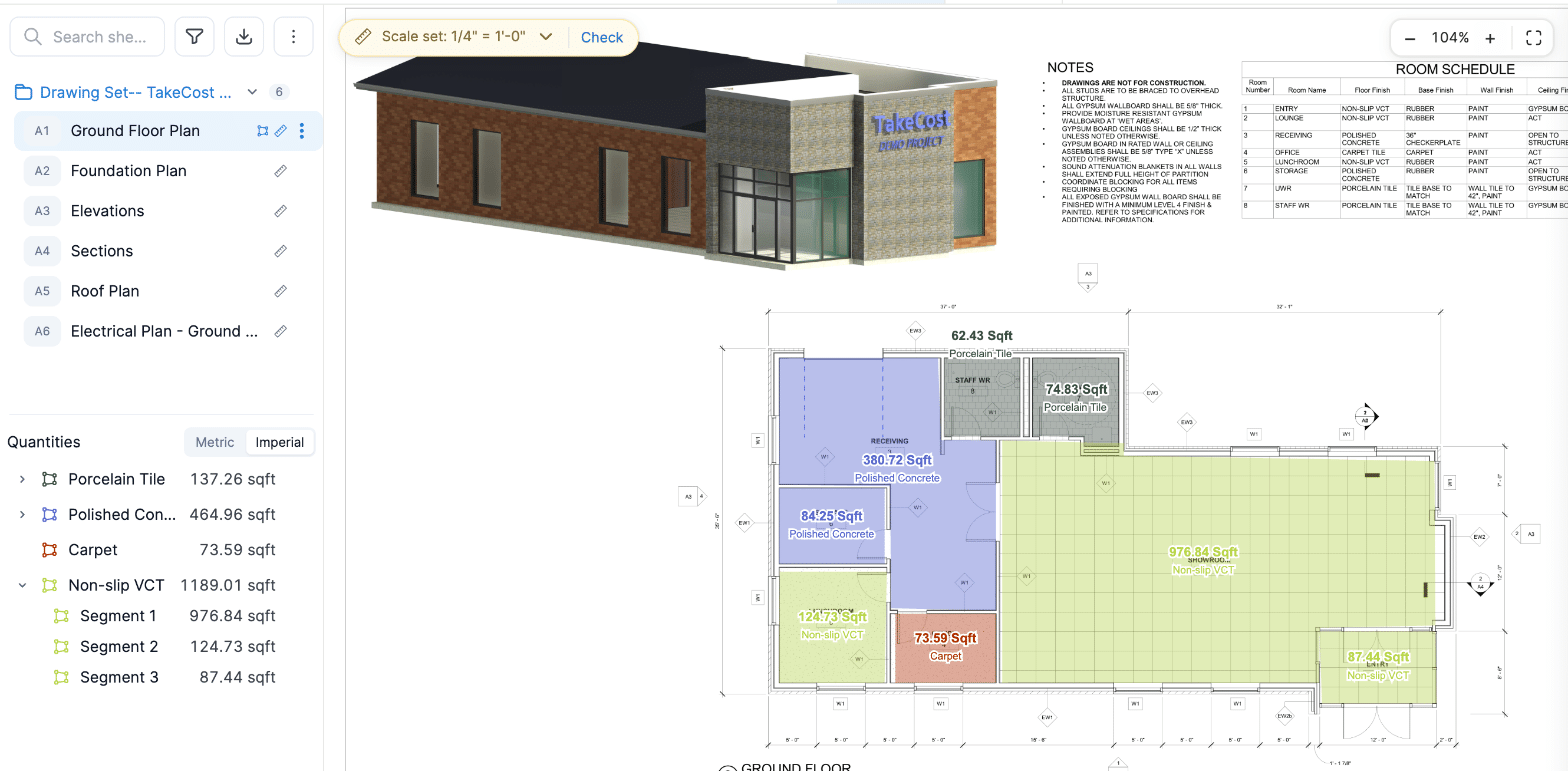
- On the drawing. The non-slip VCT floor is measured as three areas on the ground floor plan: 976.84, 124.73 and 87.44 sq ft.
- In the quantities list. TakeCost adds them up to 1,189.01 sq ft and lists each segment underneath.
- On the Estimate tab. The same 1,189.01 sq ft is already there. Nobody typed it in again.
- Priced. With an example rate of $4 per unit, where one unit covers 1 sq ft, the line rounds up to 1,190 whole units: $4,760.00 cost, plus $714.00 of markup on this material line at 15%, for a $5,474.00 sell price.
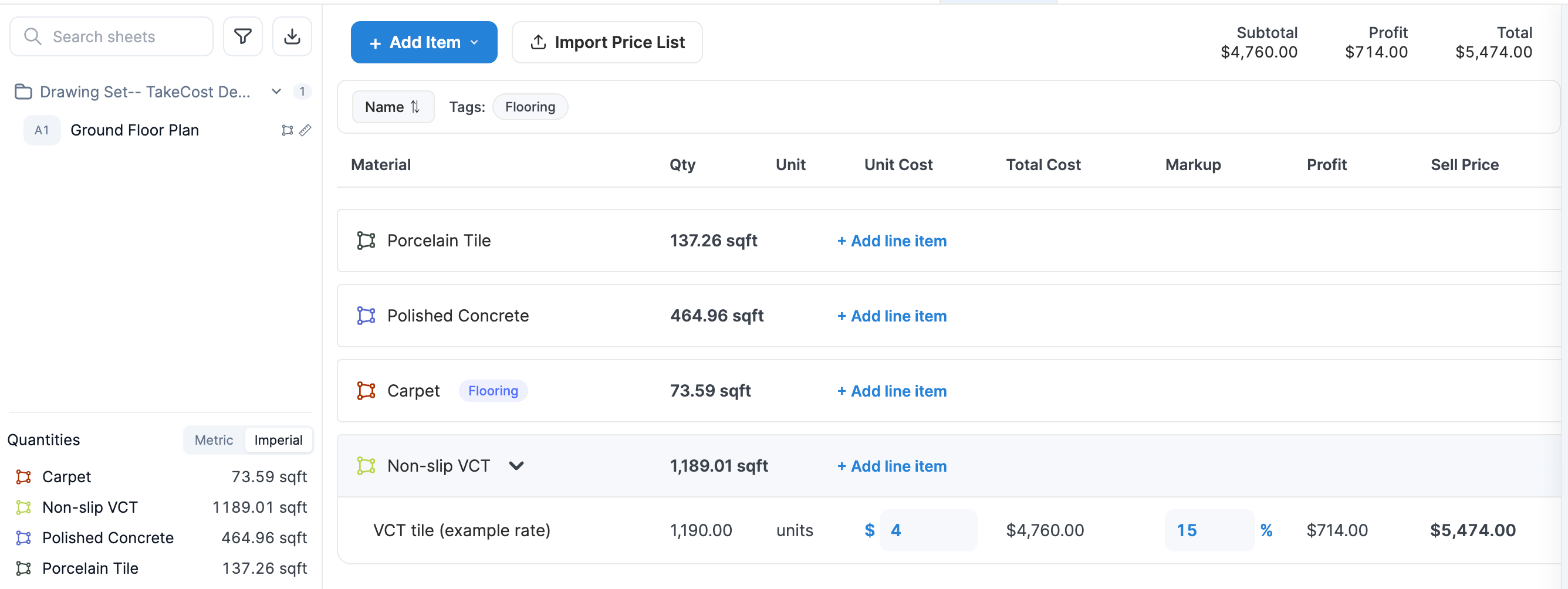
The Estimate tab shows the $714.00 as profit. Here it is only the markup on one material line. Labour, overhead and other job costs are priced separately, so $5,474.00 is the material price, not a full installed price.
Each handoff you remove is one less place for a typo. That lowers the chance of a copying error. It does not prevent every error: a wrong scale or a missed room carries straight through to the price.
Why is a quantity you can check better than a number nobody can explain?
In the example above, anyone can see where 1,189.01 sq ft came from: three shaded areas on the plan, each with its own size. If the number looks high, you can find the area that looks wrong instead of measuring the whole floor again.
That also makes a second opinion easier. You can share the project, so a partner or senior estimator reviews the same drawings and measurements you used.
Two checks still matter. The sheet’s scale is shown at the top of the drawing, and it must be right before any measurement is. And the software only knows what was measured, so a room nobody shaded is simply missing. Our list of common estimating and takeoff mistakes covers what to check before a quote goes out.
How does digital takeoff reduce setup on similar jobs?
When you add a line item in TakeCost, you can type a new name or pick one from your saved price list. On the next job with the same finish, the name and rate are already there, so similar estimates read the same way every time.
On TakeCost Pro, Smart Scopes go further for some trades: you draw once and get full material quantities, such as the studs and sheathing for a wall. Smart Scopes produce materials only. Labour is still priced by you.
Reuse is not the same as copying an old estimate. A saved rate is only as good as the last time you checked it with your supplier.
How can you check site details and scope with your crew?
Your takeoff can go to site with you. TakeCost opens in a phone’s web browser at app.takecost.com, with your own login. We opened the demo project in Chrome on a Samsung Galaxy S24 Ultra on November 5, 2026.
- Open the drawing and the saved takeoff. The ground floor plan shows the VCT areas, the room names and the finish schedule. The quantities list shows Non-slip VCT at 1,189.01 sq ft, with its three areas underneath.
- Compare the plan with the site. Tap an area to see the length of each side, such as 32′-6 7/16″ along the showroom. Check it against what is on site: a moved wall, a new doorway or a room that is not ready.
- Walk the crew through the scope. Show which rooms get the non-slip VCT and what is not included, for example that the staff washrooms get porcelain tile instead.
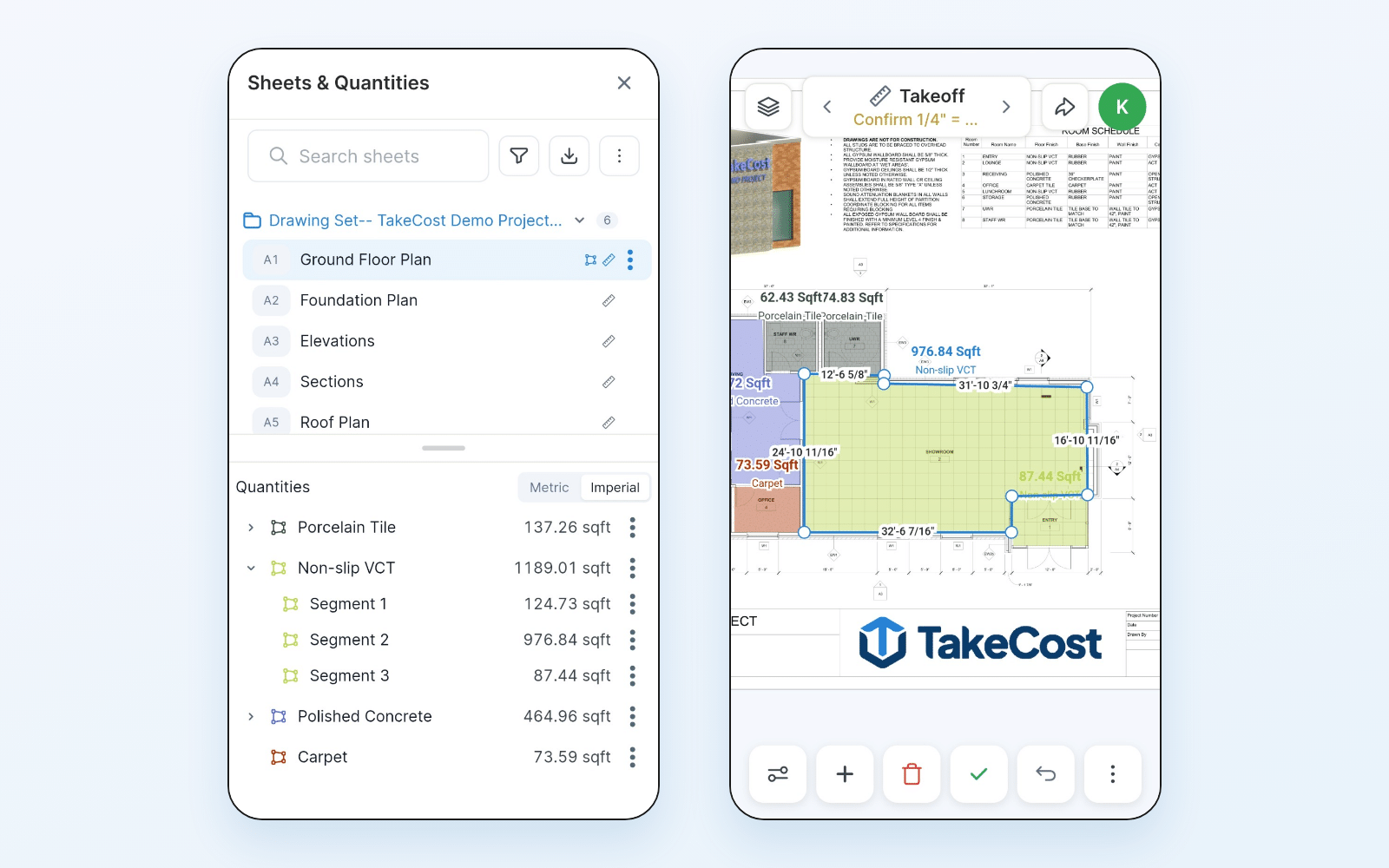
This is checking the plan’s measurements on site, not measuring the site. The phone shows what was measured on the drawing. If a room on site is a different size, measure it with a tape or laser, then update the takeoff.
Does digital takeoff mean more sales?
Not on its own. What the software can give you is estimating time back. What you do with it decides the result:
- reading the scope and specs more carefully before you price,
- confirming prices with suppliers instead of guessing,
- bidding a job you would have turned down for lack of time.
More bids, more wins and more profit still depend on choosing the right jobs and pricing them well. If you want to put a number on the time, work out your own break-even before you pay for anything.
When is your current process good enough?
If your jobs are small and simple, your current way may be enough for now. That is usually the case when most of these are true:
- You quote a few small jobs a month, and each takes minutes to measure.
- Your drawings are simple, or you measure on site anyway.
- You rarely find copying mistakes or missed items after a job is won.
- Nobody else needs to check or understand your numbers.
It is worth a trial if you see these signs instead: quantities retyped into spreadsheets, totals you cannot explain later, the same prices set up on every job, or a partner who has to redo your takeoff to trust it.
How can you test one benefit on your own drawing?
- Pick one benefit from the table that matches a real problem you have.
- Take a drawing from a job you already quoted, so you know the right answer.
- Agree on the output you need, for example a priced line for one finish or a quantity someone else can check.
- Do it in TakeCost and compare the result and the time with your original quote.
The test passes if you can produce a checked, priced scope with fewer copying or review steps than your current process.
Get started, it’s free. Every new account starts with 14 days of TakeCost Pro, up to 2 takeoffs and no credit card, which is enough to try one familiar drawing and see whether the step you picked gets easier.
Frequently asked questions
Will digital takeoff eliminate estimating mistakes?
No. It removes some copying steps and makes measurements easier to check. A wrong scale, a missed room or a bad rate still flows through to the price.
Does a small contractor need a full construction management system?
Not to improve estimating. A takeoff and estimating tool covers measuring, pricing and the proposal. A full management system adds scheduling, job costing and more setup, which only pays off if you need those too.
Can software help if measuring is not my main bottleneck?
Yes, depending on the bottleneck. TakeCost can also cut retyping, reuse your saved prices and make estimates easier to review. It cannot remove the wait for supplier replies, site access or client decisions. Test the step that slows your quotes down.
What is the difference between manual and digital takeoff?
Manual takeoff uses printed drawings, a scale rule and a calculator. Digital takeoff measures on PDF drawings on screen. Our guide to what a construction takeoff is compares the two methods.
Reviewed by: Gevoni Thomas, TakeCost
Sources
- Worked example: TakeCost demo project (office renovation, ground floor plan), measured and priced in the live TakeCost app on October 27, 2026. The $4 rate is an example, not a supplier price.
- TakeCost plans and features: takecost.com/pricing and the Subscription page in the TakeCost app, checked October 27, 2026.