
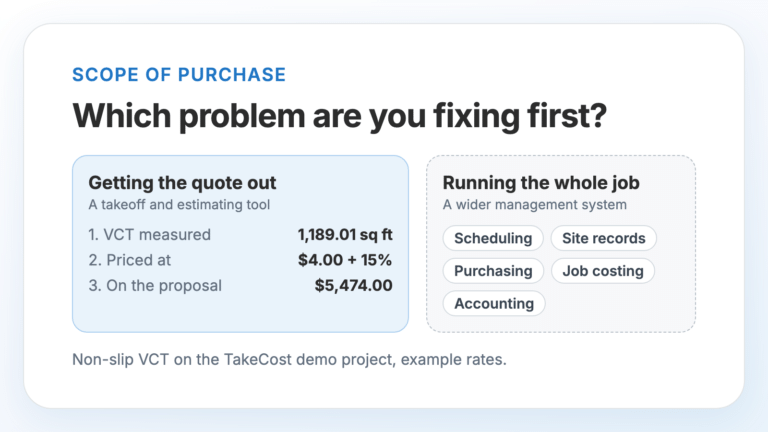

If your real problem is getting quotes out faster and with fewer mistakes, you probably do not need a full construction management system to fix it. A takeoff and estimating tool covers measuring, pricing and the proposal. A wider system makes sense when scheduling, purchasing, site records and job costs also need to change together. Start by naming which problem you have.
This guide gives you a simple way to sort your own problems, compares what each kind of software asks you to change, and shows one real TakeCost project going from drawing to proposal.
Name the problem before you choose the software
Picture an owner who wants quotes out sooner. A sales call turns into a pitch for a system that also runs schedules, purchase orders, site diaries and invoices. Maybe the business needs all of that. Maybe the only thing holding it back is the estimate. You cannot tell until you write the problems down.
Find the problems you recognise below. The right-hand column shows the kind of software that usually fixes each one.
| Your problem | Usually fixed by |
|---|---|
| Measuring by hand takes most of the time on each bid | A takeoff and estimating tool |
| Prices live in old spreadsheets and get retyped | A takeoff and estimating tool |
| Quotes are copied into a separate document by hand | A takeoff and estimating tool |
| Crews and jobs get double‑booked | A scheduling tool or a management system |
| Site photos and notes are scattered across phones | A site records app or a management system |
| Orders and deliveries are tracked by phone and email | A purchasing tool or a management system |
| You only know a job’s real cost after the books close | Job costing, accounting or a management system |
If most of your problems are in the first three rows, start with the estimate. If they are spread across the whole table, a wider system may be worth a look.
What does each option ask you to change?
Both kinds of software can be the right buy, but they ask very different things of you. This compares the categories, not any one product.
| Question | Takeoff and estimating tool | Full management system |
|---|---|---|
| Who has to learn it | Usually the person who prices the work | Office, site leads, crews and the bookkeeper |
| What you set up first | Your rates, units and markup | Your rates, plus jobs, people, cost codes and approvals |
| What it replaces | Hand takeoffs and retyped quotes | Several tools and habits across the business |
| What still happens elsewhere | Scheduling, site records, purchasing, accounting | Whatever the system does not cover or connect to |
| How to test it | Price one real job from drawing to proposal | Run one real job from quote to final invoice |
| First output to test | A checked proposal for one real job, with no quantities retyped | One real job followed from quote through scheduling, purchasing and job costs |
In both cases the same people still own the important calls. Someone checks the scope, someone sets the prices, and someone approves the quote before it goes out. Software can make those steps easier to see. It does not make the decisions for you.
A simple path to decide
- Is the estimate your main constraint? If quotes are late, retyped or hard to check, start with estimating.
- Do scheduling, purchasing and job-cost information also need coordinated change? Then assess those requirements together before choosing the system, and expect more people to be involved.
- Write down the output, the owner and the check. Name the result you need, who is responsible for it and how you will know it works. See the example below.
- Test on one real job and check that output against what you wrote down.
| Field | Example |
|---|---|
| Required output | A checked proposal without retyping quantities |
| Responsible person | The estimator |
| Success check | On one real job, the proposal totals match the takeoff and the quote goes out without copying numbers between tools |
When the estimate is your main constraint, starting there is the lower-risk move. Fewer people change how they work, and you can check the result on one real job. If you add other tools later, plan how information moves between them and who owns it.
Where TakeCost fits
TakeCost is built for the first three problems in the table: measuring, pricing and the proposal. You measure the drawing, price it with your own rates and send the proposal, all from the same numbers, so nothing is retyped. Here is the TakeCost demo project in the live app on November 2, 2026. The prices are example rates.
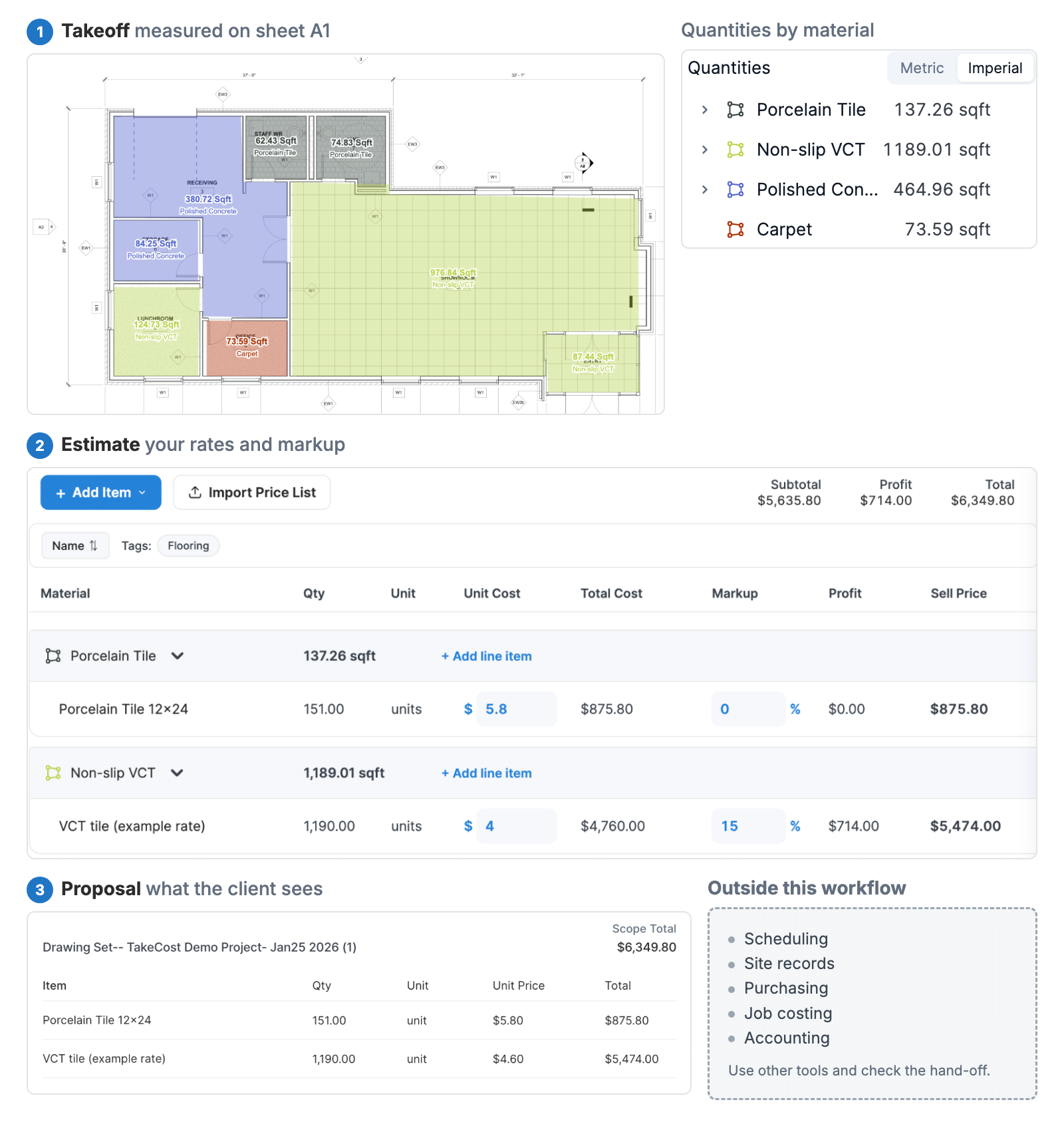
- Takeoff: floor areas measured on sheet A1, for example non-slip VCT 1,189.01 sq ft and porcelain tile 137.26 sq ft.
- Estimate: those quantities priced with your own rates and markup. VCT is 1,190 units at $4.00 plus 15% = $5,474.00. The estimate total is $6,349.80.
- Proposal: the same lines go to the client, VCT at $4.60 a unit with the markup built in, and the same $6,349.80 total.
Around that, the app keeps your opportunities, clients and proposals in one place, and you can mark each proposal Draft, Revision, Pending, Approved or Rejected, so you can see which bids are still open. You can also export your quantities as a CSV.
TakeCost stays focused on the bid. Scheduling, site diaries, purchase orders, job costing and accounting stay in the tools you already use, so you do not have to change those to get quotes out faster.
Want to try it on one of your own drawings? Get started, it’s free.
About our example
The problem table is a general guide, not a rule for every business. We did not compare named products or test any management system. The TakeCost example comes from the demo project in the live app on November 2, 2026, on a Pro account, using example rates. Check the pricing page for what each plan includes. For help choosing a takeoff tool itself, see our guide to choosing construction takeoff software.
Frequently asked questions
Can I use estimating software without replacing my accounting?
Yes. An estimating tool produces the quote. Your bookkeeping can stay where it is. Decide how the accepted price gets into your books, even if that is by hand.
When does a full construction management system make sense?
When the problems sit across the business, not only in the estimate. For example, schedules, orders, site records and job costs that keep falling out of step with each other, with several people involved.
Does TakeCost include scheduling or project accounting?
No. TakeCost focuses on the bid: the drawing, the quantities, the estimate and the proposal. You can keep using the tools you already have for scheduling, site records, purchasing and accounting.
Not sure which problem to fix first? Book a demo and bring one recent job. We will look at what it would take to get that quote out.
Reviewed by: Gevoni Thomas, TakeCost
Sources
- Workflow example: TakeCost demo project, Takeoff, Estimate and Proposal tabs in the live app, November 2, 2026.
- Opportunities, clients, proposal statuses and the quantities CSV export: TakeCost app menus, checked November 2, 2026, and the export test from October 29, 2026.
- Problem table: general guide written for this article.