

Yes, as long as the software lets you type in and save your own prices, and you keep them current. The software should do the math. It should not pick your rates.
In TakeCost, the quantity comes from your takeoff, and every material price, crew rate and markup on the line is one you enter. This guide shows who owns each input, one measured scope priced two sensible ways, and what happened in our tests when a saved rate changed.
Software should organize your pricing judgment, not replace it
An estimate line mixes measured facts with business decisions. Keep them apart and you can see which ones you have to check.
| Input | Where it comes from | What the software did in our test |
|---|---|---|
| Measured quantity | Your takeoff, checked by you | Calculated the area from the drawing: 1,189.01 sq ft of VCT |
| Purchase units and waste | Your supplier’s pack size and your waste allowance | Added the waste you set and rounded up to whole units when Round to Purchase Units is on |
| Material price | A supplier quote, invoice or negotiated price | Multiplied units by the price you typed |
| Crew rate | What an hour of your crew costs you | Multiplied hours by the rate you typed |
| Daily output | What your crew installs in a day | Turned daily output into hours for this quantity |
| Markup | Your business | Added the markup you set on each line |
Every number in the middle column is yours. In our test, a new line started with an empty price until we typed one or picked a saved item. If you use Smart Scopes, they give you material quantities only. Labour is a line you add yourself.
What prices does your business already know?
You probably know more than any national average can tell you:
- Supplier quotes. Note the date, how long the price holds and the quantity it was quoted for.
- Negotiated account prices. They are real, but they may not apply to a special order.
- Your crew’s hourly cost. What an hour actually costs you, not just the wage.
- Production from past jobs. How much your crew really installed in a day on similar work.
A saved rate is convenient. It can also be wrong for the next job. A tile price quoted for a full pallet does not hold for a few boxes, and a crew that lays 480 sq ft a day in an open showroom will not do that in small rooms. Saving a rate does not make it current.
The same quantity can produce different sensible prices
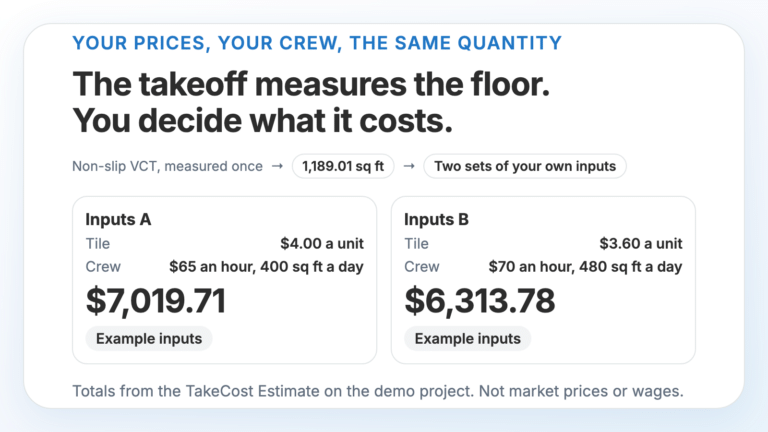
Here is one measured scope from the TakeCost demo project: 1,189.01 sq ft of non-slip VCT. We priced it twice in the live app with two sets of example inputs. Only the inputs changed. The measurement did not.
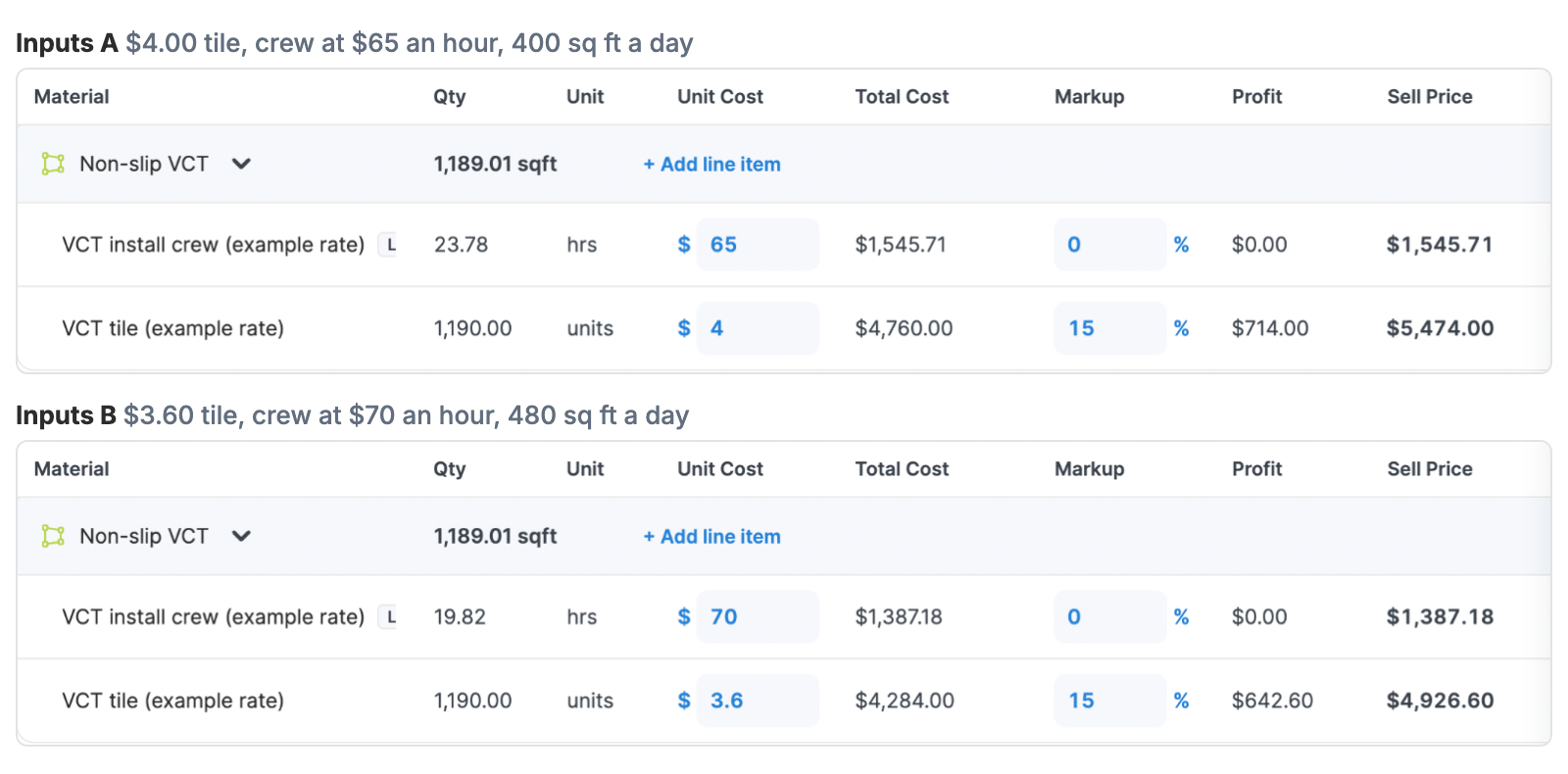
| Line | Inputs A | Inputs B |
|---|---|---|
| Measured VCT | 1,189.01 sq ft | 1,189.01 sq ft |
| Tile (whole units, 15% markup) | 1,190 × $4.00 = $4,760.00, sells at $5,474.00 | 1,190 × $3.60 = $4,284.00, sells at $4,926.60 |
| Crew rate and output | $65 an hour, 400 sq ft a day (50 an hour) | $70 an hour, 480 sq ft a day (60 an hour) |
| Crew hours and cost | 23.78 hrs = $1,545.71 | 19.82 hrs = $1,387.18 |
| VCT scope price | $7,019.71 | $6,313.78 |
The difference is $705.93 on the same floor. A cheaper tile and a faster crew both pushed B down, even though B’s crew costs more per hour. Neither is the right market price. Both are examples, not wages, supplier prices or a suggested bid.
How the example is set up: each crew works an 8-hour day, and each hourly cost and daily output describe the same crew. The 15% markup is on the tile only. Labour carries no markup in this example. These installation crew rates are what an hour on site costs you, not the cost of your own estimating time.
A note on the hours: the table shows them to two decimals, but the app works out the cost from the unrounded figure. For inputs B, 19.82 × $70 would give $1,387.40. The app’s $1,387.18 comes from 1,189.01 ÷ 60 = 19.8168 hours × $70. Inputs A work the same way: 1,189.01 ÷ 50 = 23.7802 hours × $65 = $1,545.71.
Notice too that the app rounds tile up to whole units but leaves crew hours as they are. Check how each line rounds before you trust the total. For the full calculation, see how to build a construction estimate.
Bring a scope you have priced before and see what your own numbers give you. Get started, it’s free.
What happens when you save or change a rate?
Every price you save goes into your Catalog, under Cost List. On the next job you search the label and pick the saved item, so its unit, coverage and price come with it instead of being typed again. Over time that builds into your own pricing library, which makes each new estimate quicker to put together.
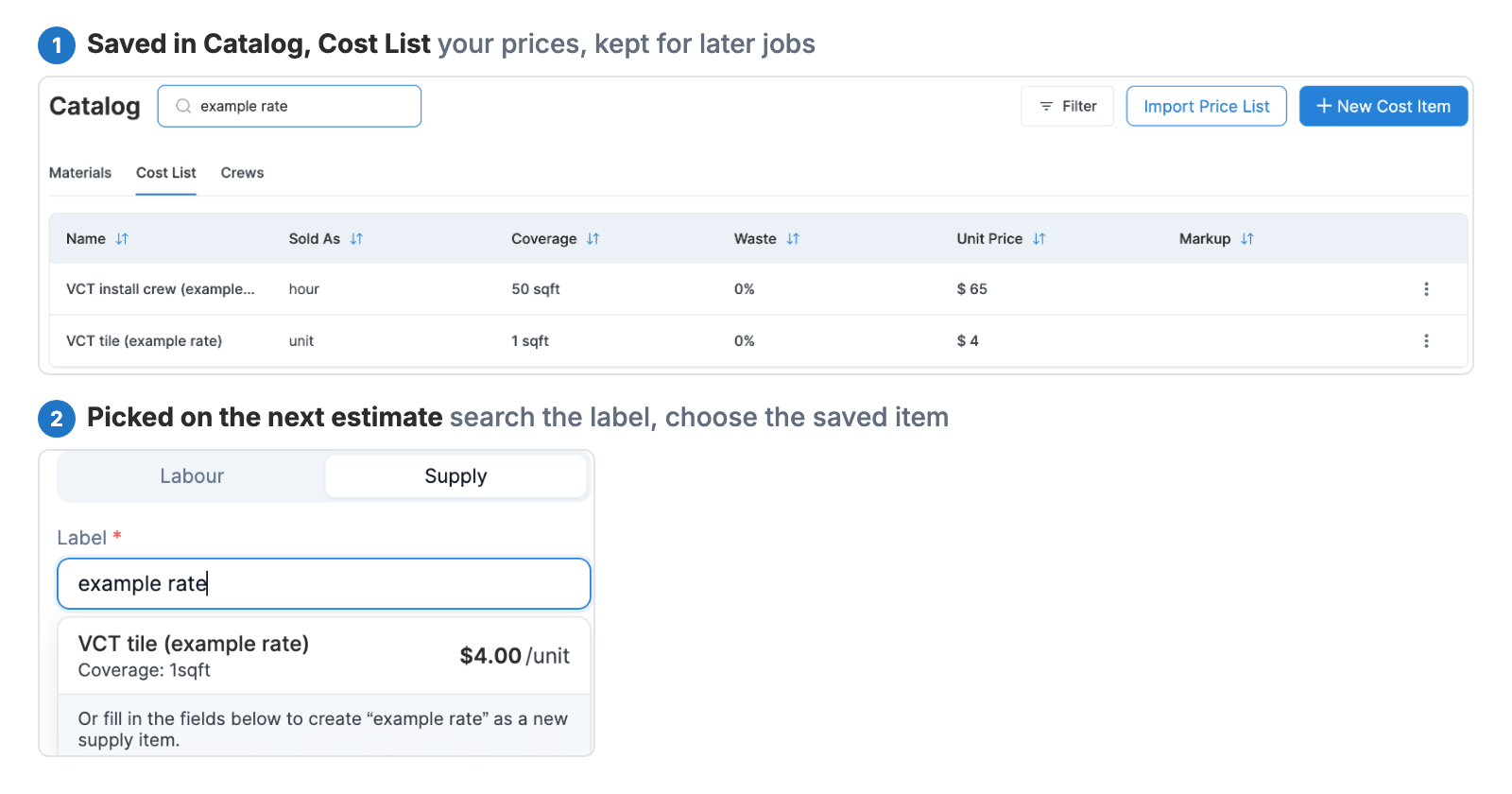
This is the question most vendor pages skip. Here is what we saw in TakeCost on November 2, 2026:
| What we did | What happened |
|---|---|
| Added a new labour line in an estimate | It was also saved to the Cost List in the Catalog, at the rate we entered |
| Changed that line’s rate in the estimate | Only this estimate changed. The Cost List kept the old rate. |
| Changed a price in the Cost List | A line already in an estimate kept its old price |
| Imported a one-line price list (CSV) | It mapped our columns, flagged duplicates and missing data, and added the item to the Cost List |
So an old estimate keeps the prices it was built with. That protects a price you have already sent. It also means a new supplier price only reaches an existing estimate if you change it there yourself. Before you pick a saved rate for a new job, check that it still suits that job.
Pricing a scope with several material and labour lines is listed under the Pro plan in TakeCost, and our test ran on a Pro account. Check the pricing page for what each plan includes.
What should you check in a software demo?
- Where do your material and labour prices live, and can you type in your own?
- If you change a saved rate, does it change only new estimates, or old ones too?
- Can you bring in a supplier’s price list, and in what file format?
- Does a material line show its unit, coverage, waste and rounding?
- Is labour priced from a rate and a daily output, or only a lump sum?
- Which plan includes the pricing features you need?
- Does the proposal show the price you expect, and nothing you would rather keep private?
Do not take a list of features on trust. Ask to see your own job priced with your own numbers.
Who keeps saved rates useful?
| Question | A sensible answer |
|---|---|
| Who owns the prices? | One named person, usually the owner or the estimator |
| When are they checked? | Before each bid, and whenever a supplier quote expires |
| What gets checked first? | The few items that make up most of your price |
| What happens to old rates? | Update them or remove them, so nobody picks a stale one |
Then run a pilot: take a scope you have already priced, enter your own current prices and crew rates, and compare the result with what you sent last time. Explain every difference before you use it on a live bid. If something is unclear, book a demo and bring that job and your price list.
About our example
The two sets of inputs are examples, not market prices, wages or a recommended bid. The results come from the TakeCost demo project in the live app on November 2, 2026, on a Pro account. We put the demo back to its original prices afterwards. We did not test supplier price feeds, automatic price updates or importing a large price list.
Frequently asked questions
Does estimating software supply current local material prices?
Some products include price databases. In our TakeCost test, every price came from us: typed on the line, picked from the saved Cost List or imported from our own file. Whatever is in your list, check that the prices are current and local to you.
Can I use negotiated supplier prices and my own crew assumptions?
Yes. In TakeCost you type the material price and the crew’s hourly rate and daily output on each line, and save them to your Catalog for next time.
Does changing a saved rate update an old estimate automatically?
Not in our test. A line already in an estimate kept its price when we changed the saved rate. Update an existing estimate yourself when a price changes.
Reviewed by: Gevoni Thomas, TakeCost
Sources
- Two-scenario example and reuse tests: TakeCost demo project, non-slip VCT, Estimate tab and Catalog in the live app, November 2, 2026.
- Saved pricing: the Catalog Cost List and the Add pricing panel in the live TakeCost app, captured November 5, 2026, with the demo project’s example items.
- Plan wording: the plan list in TakeCost’s account settings, which puts scope-based pricing with several material and labour costs under Pro.
- Example tile prices, crew rates and outputs: examples made for this guide.
- Vendor help pages on custom rates and price databases, read November 2, 2026. None showed a priced example or said whether old estimates change.