
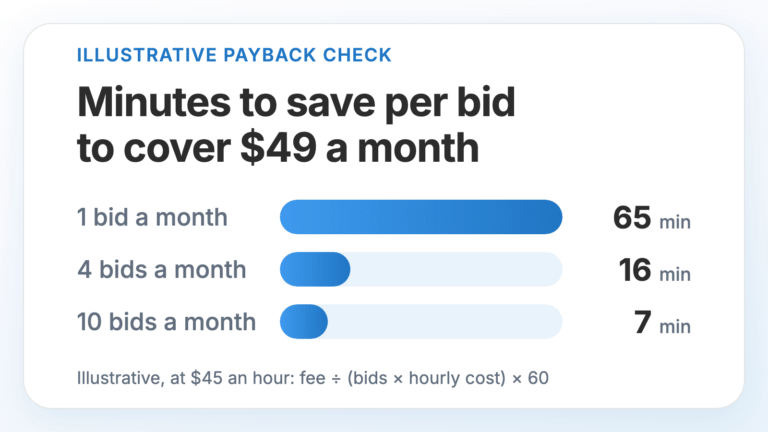

Takeoff software costs from $0 to about $300 per user a month, depending on how it is billed and what it covers. TakeCost Core is free with 1 new takeoff file a month, and TakeCost Pro is $49 a month, or $490 paid upfront for a year. A paid plan is worth it when the estimating time it frees each month is worth more than the fee. At four bids a month and $45 an hour, that takes about 16 minutes saved per bid.
This guide shows what you pay for, what to count in the first month, and a simple payback formula you can run on your own bids. The worked numbers are an illustration, not customer results. Replace them with your own.
What are you actually paying for with takeoff software?
Most takeoff software is sold as a subscription. Before you compare prices, check how each plan is charged:
- Per user or per account. Some vendors charge for every person who logs in. Others charge per account or offer team pricing on request.
- Usage limits. Free and entry plans often limit how many projects or takeoffs you can start each month.
- Billing term. Monthly plans cost more per month than yearly plans, but you are not locked in for a year.
- Extras. Larger systems can add setup, training or support fees. Ask for the full first-year cost in writing.
- Takeoff only, or takeoff to price. A tool that only measures leaves pricing and the quote to another tool or a spreadsheet. Count that time too.
Here is what published plans cost, checked on each vendor’s own pricing page on November 5, 2026. These are US list prices before tax.
| Type of plan | Examples | How you pay |
|---|---|---|
| Free plans | TakeCost Core: $0 | No card, with a monthly limit on new takeoffs |
| PDF markup and measuring | Bluebeam: $260 to $590 per user a year | Per user, paid yearly |
| Desktop takeoff licences | PlanSwift: $2,000 to $3,000 per seat a year | Per seat, paid yearly |
| Cloud and AI takeoff | STACK: from $299 per user a month. Togal: $299 per user a month, billed yearly | Per user. Billed yearly, $299 a month is $3,588 per person |
| Company plans with users included | Buildxact: $199 to $599 a month. Handoff: $119 to $719 a month, billed yearly | Per company. Some plans need a 12-month commitment |
| TakeCost Pro | $49 a month, or $490 a year | Per person, monthly or one yearly payment |
When a plan is billed yearly, the monthly figure is only an average. You pay the full year upfront, so compare that amount too.
Here is what TakeCost charges, checked on the TakeCost pricing page and in the app’s Subscription page on November 5, 2026.
| Plan | Price | What it covers |
|---|---|---|
| Core | $0, free forever | Area, length and count takeoff tools, 1 new takeoff file each month, sharing for review, unlimited proposals and revisions, Congic Assistant for quick help |
| Pro | $49 a month, or $490 paid upfront for a year (about $40.83 a month, 2 months free) | Everything in Core, plus unlimited takeoffs, scope-based pricing with your own material and labour costs, 1-click proposals, spreadsheet and PDF markup exports, Smart Scopes and priority support |
| Pro trial | $0 for 14 days, no credit card | Up to 2 takeoffs during the trial |
Core’s free takeoff file resets each month on your sign-up date. Smart Scopes work out material quantities from what you draw. Labour is priced separately, using your own rates. Larger teams can ask TakeCost for custom pricing.
Why does the first month cost more than the fee?
The first month includes time you spend once: learning the tool, checking a past job and setting up your prices. After that, the cost is the fee plus the time you spend checking each takeoff. Keep the two apart, or one slow first month will make the software look worse than it is.
| Cost | First month | Every month after |
|---|---|---|
| Subscription fee | Yes, unless you are still on the free trial | Yes |
| Learning the tools | Yes | Only for new staff |
| Running one past job as a test | Yes | No |
| Setting up your material prices and labour rates | Yes | Small updates when prices change |
| Checking and correcting each takeoff | Yes | Yes |
Time from staff you already pay is not new cash spending. It is time taken from other work. Count it at the value of an hour, but do not add it to the bank balance as if it were a bill.
How do you calculate when takeoff software pays for itself?
Start with time per bid. Time one comparable job from opening the drawings to a priced quote you would send. Then time the same kind of job with the software, including checking and corrections.
- Net minutes saved per bid = minutes per bid now − minutes per bid with the software, checking included
- Capacity value per month = bids per month × net minutes saved ÷ 60 × hourly cost of your estimator × share of saved time you use
- Capacity value after subscription = capacity value per month − monthly fee
- Break-even minutes saved per bid = monthly fee ÷ (bids per month × hourly cost × share of saved time you use) × 60
Worked example (illustrative). You bid four comparable jobs a month. Each takes 120 minutes now and 90 minutes with the software, checking included. Your estimator’s time costs $45 an hour, and you use all of the time saved. The 30 minutes saved on four bids is 2 hours, worth $90 of estimating capacity a month. Pro costs $49 a month, so the capacity value after subscription is $41 a month. The break-even point is $49 ÷ (4 × $45) × 60, or about 16 minutes saved per bid.
Now add the first month. Four hours of setup at $45 is $180. The first month comes out at $41 − $180 = −$139, and the setup time is won back in about 4.4 months. On the yearly plan you pay $490 upfront. Spread over 12 months that is about $40.83 a month, and the break-even point drops to about 14 minutes per bid.
The same formula gives very different answers when the workload changes. These rows use a $45 hour, the $49 monthly fee and all of the saved time. Break-even minutes are the minutes you need to save on each bid.
| Case | Bids a month | Minutes saved | Value after fee | Minutes to break even |
|---|---|---|---|---|
| Low volume | 1 | 15 | −$38 | 65 |
| Usual, monthly plan | 4 | 30 | $41 | 16.3 |
| Busy period | 10 | 30 | $176 | 6.5 |
| No time saved | 4 | 0 | −$49 | 16.3 |
With 4 hours of setup, the usual case wins back its setup time in about 4.4 months, or 3.7 months on the yearly plan. The busy case does it in about a month. The other cases never do.
Two things stand out. With one bid a month, the fee is hard to cover, and Core’s free takeoff file may already be enough. If checking the software’s work takes longer than measuring by hand, no price is low enough to pay back.
Does saved estimating time count as cash savings?
No. The results above are capacity value: estimating time you get back, priced at what it costs you. It turns into money only when you use it. Extra bids are an opportunity, and revenue follows only when that work is won and delivered. Paid work or less overtime count too. If the time just disappears into a quieter week, the software still costs $49 and the business is not better off.
So when you run the numbers, count only the share of saved time you will actually use. Use 50% and the $90 in the worked example becomes $45. After the $49 fee that is −$4 a month, so at that level the plan does not pay for itself in time alone. A real-job trial shows how much of the time you would actually use.
What changes with one, three or five estimators?
Do not multiply one person’s savings by everyone on the payroll. Count the people who will create takeoffs and prices, and the bids the whole team actually sends. In these cases each estimator has their own Pro plan. One estimator is assumed to use all of the saved time. A team is assumed to use 75%, because some saved minutes fall between jobs.
| Team | Team bids a month | Time used | Fees a month | Value after fees | Minutes to break even |
|---|---|---|---|---|---|
| 1 estimator | 4 | 100% | $49 | $41 | 16.3 |
| 3 estimators | 12 | 75% | $147 | $55.50 | 21.8 |
| 5 estimators | 15 | 75% | $245 | $8.13 | 29.0 |
Adding people raises the fee straight away, but bids only rise if there is work to bid. Five estimators sharing 15 bids need almost twice the time saving per bid that one estimator needs: 29 minutes against 16. At 75% use, that team is only $8.13 a month ahead after five $49 plans, so a slightly longer check or one fewer bid puts it below zero. That is why the case is marginal. At 20 team bids a month, the same team would come out about $92.50 a month ahead.
Setup is shared in part, because one person can set up the price list for everyone, but each new user still has to learn the tools. With 4, 10 and 16 hours of setup ($180, $450 and $720), the one- and three-person teams win it back in about 4.4 and 8.1 months. At 15 bids a month, the five-person team would take more than seven years, so it pays back only with more bids or a bigger time saving per bid.
Every person who uses TakeCost needs their own account. Count one Pro plan for each estimator who will create takeoffs and prices. Someone who only reviews shared jobs can use a free account.
When is the Free plan enough?
- You start one new takeoff a month or fewer. TakeCost Core covers 1 new takeoff file a month for $0.
- Your jobs are small and quick to measure by hand. If a takeoff takes 20 minutes now, there is little time left to save.
- You would not use the time. If you cannot bid more work or bill the hours, the value stays on paper.
- Checking eats the saving. Every quantity still needs a check by someone who knows the job, and that time belongs in the formula.
Core still gives you the area, length and count tools, sharing and unlimited proposals, so you can start free and move up when your bid volume grows. Whatever plan you use, you still read the drawings, decide the scope, set your own prices and check the totals before a quote goes out.
How do you check the value before you pay?
Use one real job, not a demo. Pick a past job you know well, so you can tell whether the quantities and prices are right.
- Write down how long the job took you, from drawings to a priced quote.
- Run the same job in the 14-day Pro trial. It allows up to 2 takeoffs and needs no credit card.
- Time all of it: measuring, checking, fixing, pricing and the proposal.
- Compare the quantities and the total with your original quote.
- Put both times, your bids per month, your hourly cost and the share of time you would use into the payback formula.
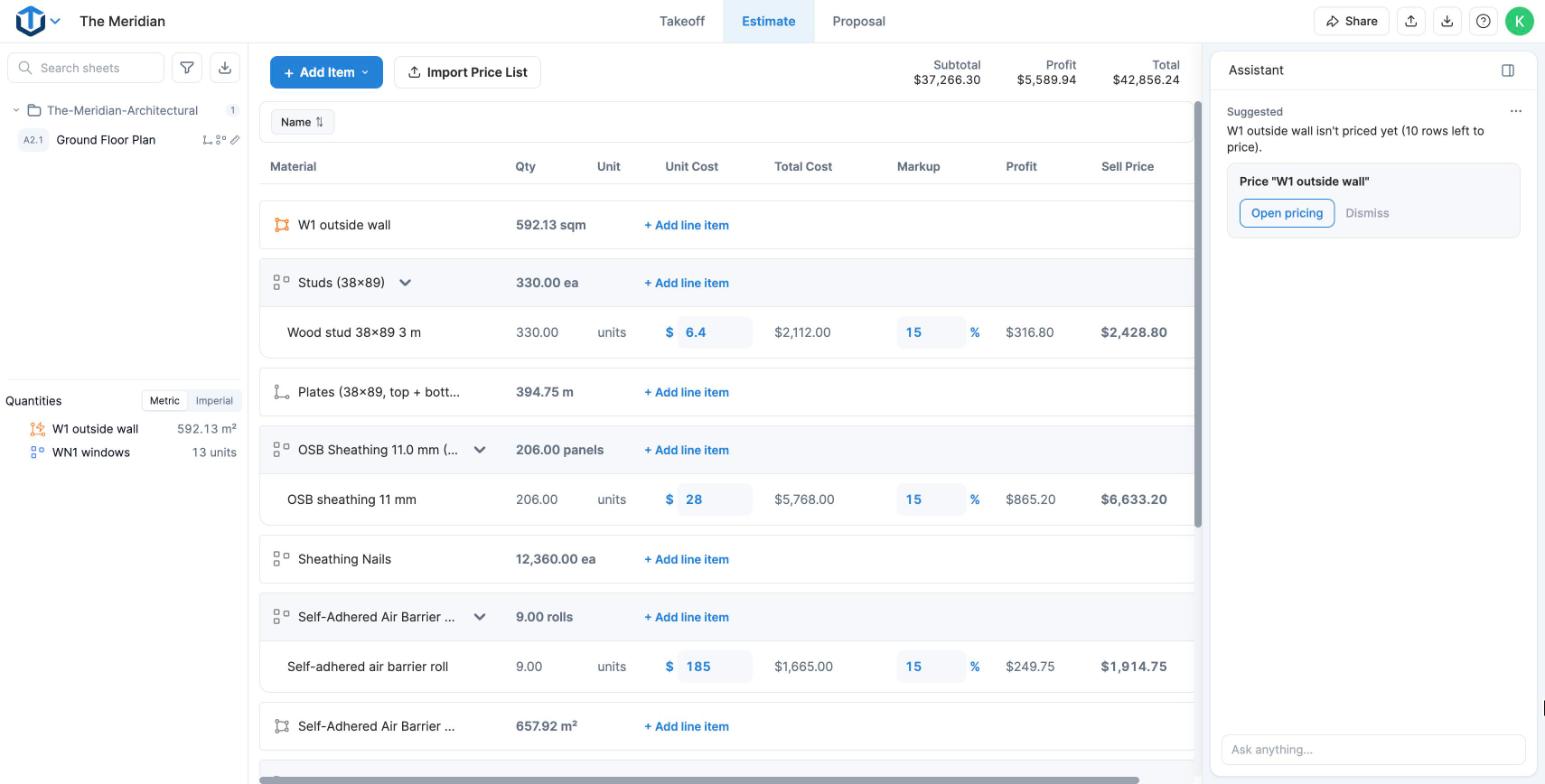
The Estimate view above is what the test should end with: quantities from the drawing, your own unit costs and markup, and a total you can check. A screen like this shows the output, not the time saved. Only your own timing shows that.
Then decide. Upgrade if the capacity value after subscription is positive with a realistic share of time used. Keep testing on a second job if it is close to break-even. Stay on Core or your current process if the result is negative, and check again when your bid volume grows.
Ready to test it on your own job? Get started, it’s free, run one representative bid in the 14-day Pro trial, then compare your time against the current plan prices.
Frequently asked questions
Is the $49 a month plan a monthly subscription I can cancel?
Yes. TakeCost Pro is billed monthly at $49, or once a year at $490 paid upfront. The app’s account page says you can upgrade or cancel at any time with no contract.
Do saved estimator hours count as cash savings?
Not on their own. Saved hours are capacity. They become money only when you use them for paid work or less overtime, or for extra bids that you win and deliver.
Is paid takeoff software worth it for only a few bids a month?
It depends on the time saved per bid. At four bids a month and $45 an hour, $49 needs about 16 minutes saved per bid. At one bid a month it needs about 65 minutes, and TakeCost Core’s free takeoff file may be enough.
Is there a free trial?
Yes. The Pro trial lasts 14 days, allows up to 2 takeoffs and needs no credit card. After the trial you move to Core, with 1 new takeoff file a month.
What should I compare besides the price?
Compare what you get at the end. A tool that only measures still leaves pricing and the quote to you. If you are still choosing a type of tool, see our guide to the best construction takeoff software, and for the pricing steps, how contractors build a construction estimate.
Reviewed by: Gevoni Thomas, TakeCost
Sources
- TakeCost plans and prices: takecost.com/pricing and the Subscription page in the TakeCost app, both checked November 5, 2026.
- Market prices: the pricing pages of Bluebeam, PlanSwift, STACK, Togal, Buildxact and Handoff, checked November 5, 2026. US list prices before tax. Prices change often, so check each vendor’s own pricing page.
- Payback cases: TakeCost’s illustrative model at $45 an hour. The figures are assumptions, not customer results.